WINCTRL URSA MINOR 32: CALIBRATE FIRST, BIND SECOND
1. In SimAppPro select the URSA Minor 32 Throttle and any fitted 32 PAC. Test buttons and axes. 2. Follow the calibration-tab procedures in the stated order. 3. Select the device in MSFS and save a dedicated profile before proceeding to Fenix MCDU calibration. [74, Steps1-10: SimAppPro, MSFS profile, Fenix calibration]
The example maps throttle 1 to RAXIS X and throttle 2 to RAXIS Y, both reversed; flaps to Slider Y; spoilers to Slider X reversed. A/THR disconnect uses button 10 or 11. Verify the detected input rather than borrowing another device's identifiers. [74, Assignment table: throttles, flaps, spoilers, A/THR disconnect]
Button 39 arms spoilers on press and disarms on release in the example. Preserve both edges, save the profile and check the physical switch against the cockpit armed state. A press-only setup can leave the two states out of agreement. [74, Assignment table: arm/disarm auto spoilers, button39]
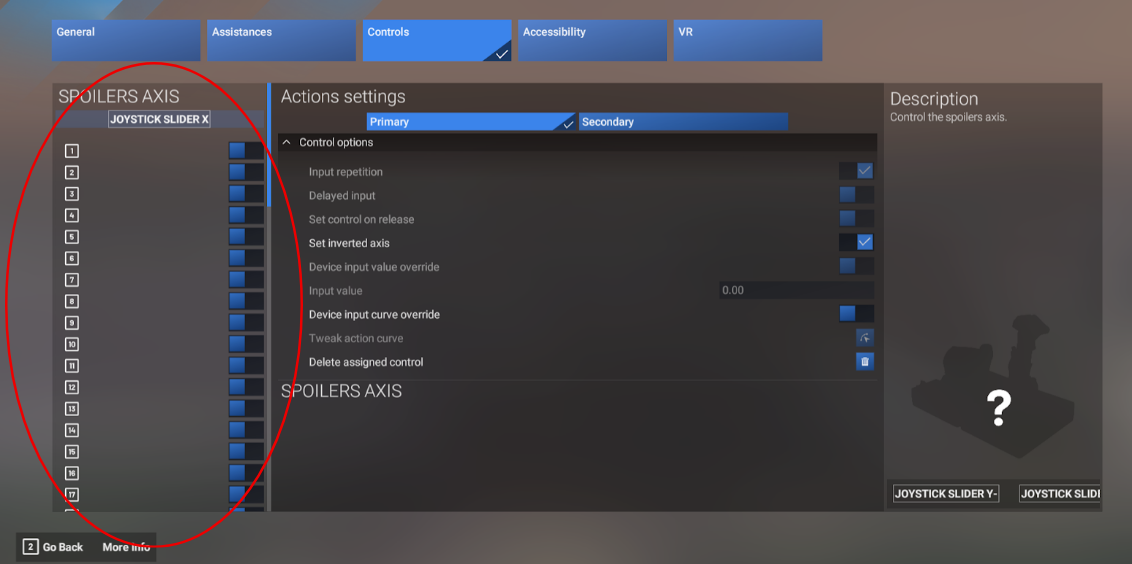
Official URSA setup illustration: axis selection and reversal belong to the specific assignment. Device-specific identifiers. [74, Fig6: axis assignment editor]