CABIN READINESS IS AN EVENT SEQUENCE WITH SEPARATE EVIDENCE
Treat doors closed, slides armed, cabin checks complete and Cabin Ready as separate states. The FAP provides cabin information and supported controls within the CIDS/Virtual Purser model. The V3 presentation and developer documentation describe connected functions rather than a single shortcut that establishes the whole cabin. Prepare the required ground-service and door state, then follow the actual cabin sequence and its receiving indications. A completed boarding animation or closed-door drawing alone does not prove that the appropriate safety check and readiness report have occurred. [53, CIDS and FAP chapters] [81, Virtual Purser duties and event-driven behaviour]
The current Virtual Purser guide describes duties driven by events and their conditions, with actions taking time. It explains that a cockpit cabin call expedites supported checks, allowing their completed sequence to produce Cabin Ready sooner. That distinction matters when the aircraft is approaching a holding point while cabin work is still developing. Read the report and indication as the result of the sequence. Repeatedly calling the cabin is not used as proof that an outstanding door, service or configuration condition has disappeared. [81, VP Behaviour: Cockpit Cabin Call and V3 readiness sequence]
Cabin Ready presentation and the call itself are configurable. The current livery documentation allows none, checklist or memo display and a separate readiness-call option. Establish which combination is in use before diagnosing an absent memo. The developer guide describes receiving an interphone call through the CAB listening/ATT arrangement on the applicable audio panel. Use the installed panel and verify its channel/volume selections. The dated 24–25 October 2026 issue snapshot also records an intercom/readiness investigation, so preserve build context when the documented sequence and observed result differ. [70, Cabin Ready call/display options] [81, Interphone] [83, Dated FAP/intercom investigations]
Platform and camera mode can affect access without changing the cabin system itself. The official MSFS 2024 walkaround article, updated 21 October 2026, explicitly says the FAP cannot be interacted with in walkaround mode. Use a supported view for that interaction rather than interpreting the camera limitation as a CIDS fault. The 22 October hotfix announcement identifies a FAP camera-view addition for MSFS 2024. Keep that concrete implementation detail separate from general Airbus FAP behaviour and from any different issue reported on MSFS 2020. [140, FAP interaction limitation in walkaround mode] [122, 22 October 2026 hotfix; MSFS 2024 FAP camera view]
For a cabin-coordination exercise, record the active pack, readiness display/call settings, actual passenger/service state and the door/slide sequence. Observe which event started the cabin work and which report marked completion. Repeat with one documented setting change if a different presentation is being studied. On arrival, verify the configured door-disarming policy before ground access; an airline option can leave selected emergency exits armed during turnaround. The useful outcome is an explained cabin state, with actions and reports attached to the appropriate phase of the flight. [81, Door behaviour and turnaround policy] [70, Virtual Purser turnaround settings]
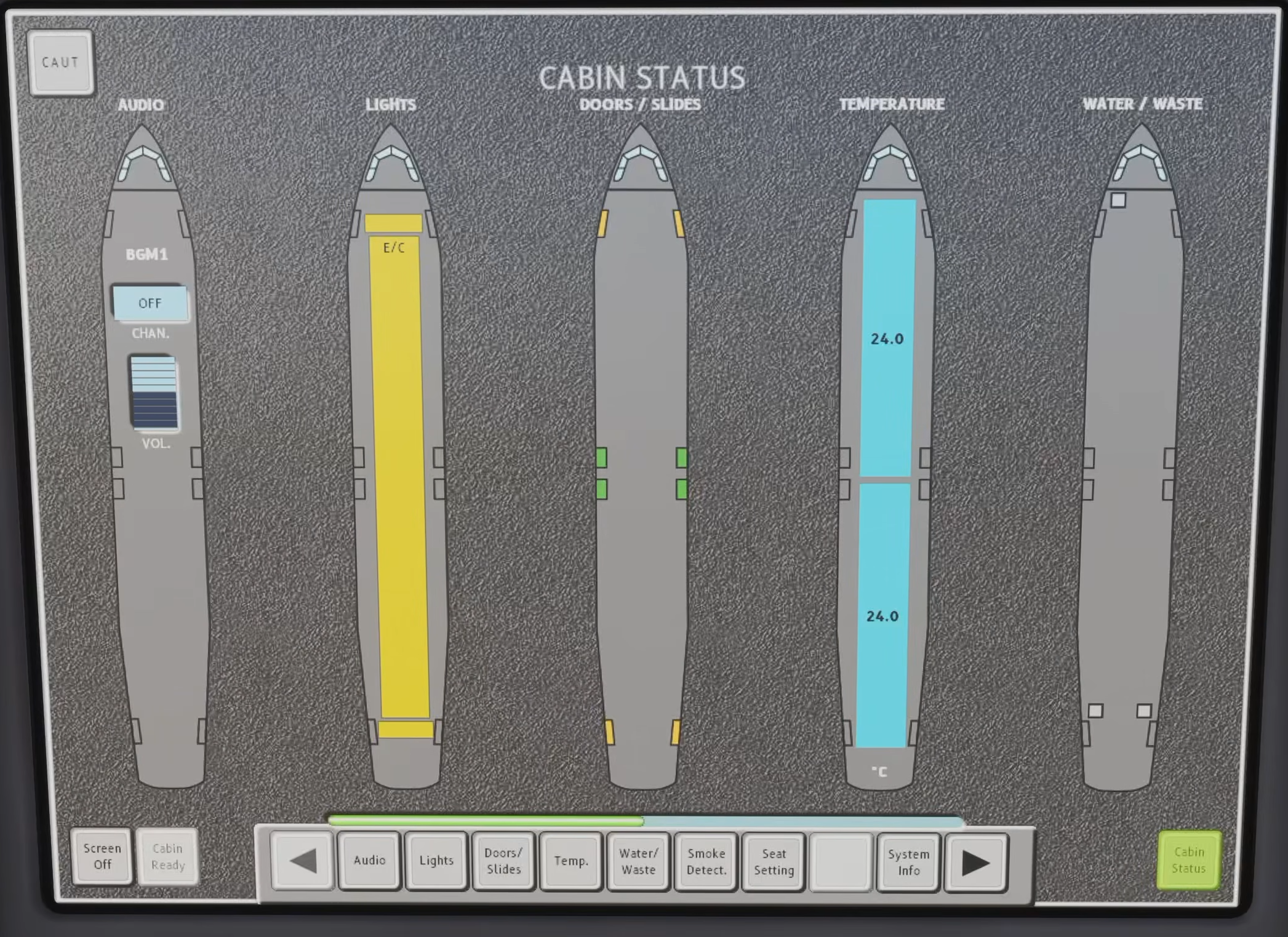
Original Fenix V3 FAP Cabin Status page: doors/slides, temperature, water/waste and the Cabin Ready button. Read the actual state rather than inferring that every item is ready. [82, Source illustration]