DISPLAY GENERATION, WARNING LOGIC AND RECONFIGURATION
A display unit is the visible endpoint of a longer information chain. Source sensors feed computers and concentrators; display-management functions generate the presentation; warning computers apply warning logic and priority. In the supplied EIS architecture, alternate display and computer routes permit specified reconfiguration. A blank display, a failed generating computer and invalid sensor data are different failures even when the crew first notices an absent parameter. Switching a presentation can recover a view without repairing the original sensor or warning source. [60, PDF pp. 4–8]
ECAM separates upper engine/warning information from lower system/status information, subject to reconfiguration. Warning colour, attention getters, automatic page calls, advisories and memos serve different purposes. A configuration memo need not mean a malfunction; a cleared action line need not mean the aircraft has regained its former capability. Primary and secondary consequences can share one initiating failure. Read the message, associated system page and remaining status as a structured explanation of the present aircraft, not as unrelated text to remove from the screen. [60, Chapters1.31.10–1.31.25; warning priorities, failures, memos and status] [88, ECAM philosophy; sequence and retained status]
The PFD and ND also combine information with different sources and validity. Attitude, barometric altitude, radio height, speed references, route geometry and raw radio deviation are not produced by one common sensor. The FMA identifies the active and armed guidance/thrust state, not the integrity of every underlying measurement. A correctly annunciated mode can still be acting on an unexpected target or affected source. Conversely, an armed mode waiting for capture is not proof of an automation failure. [60, Chapters1.31.40–1.31.45; PFD/ND information] [21, PDF pp. 51–64, 159–160]
A reconfiguration assessment should state the lost item, selected replacement, surviving input sources and remaining capability. Presentation recovery can change workload and screen allocation even when essential data remains available. Reference drawings contain source-example figures and fault states; their numbers are not operational targets. For Fenix, distinguish a documented cockpit display/control function from a graphics-rendering problem and from a selected aircraft failure. Recording the exact screenshot, source state, mode and build provides more useful evidence than resetting several systems before identifying the cause. [60, PDF pp. 4–8] [86, Failures Guide; simulated failure scope] [75, Input/calibration checks when interpreting unexpected response]
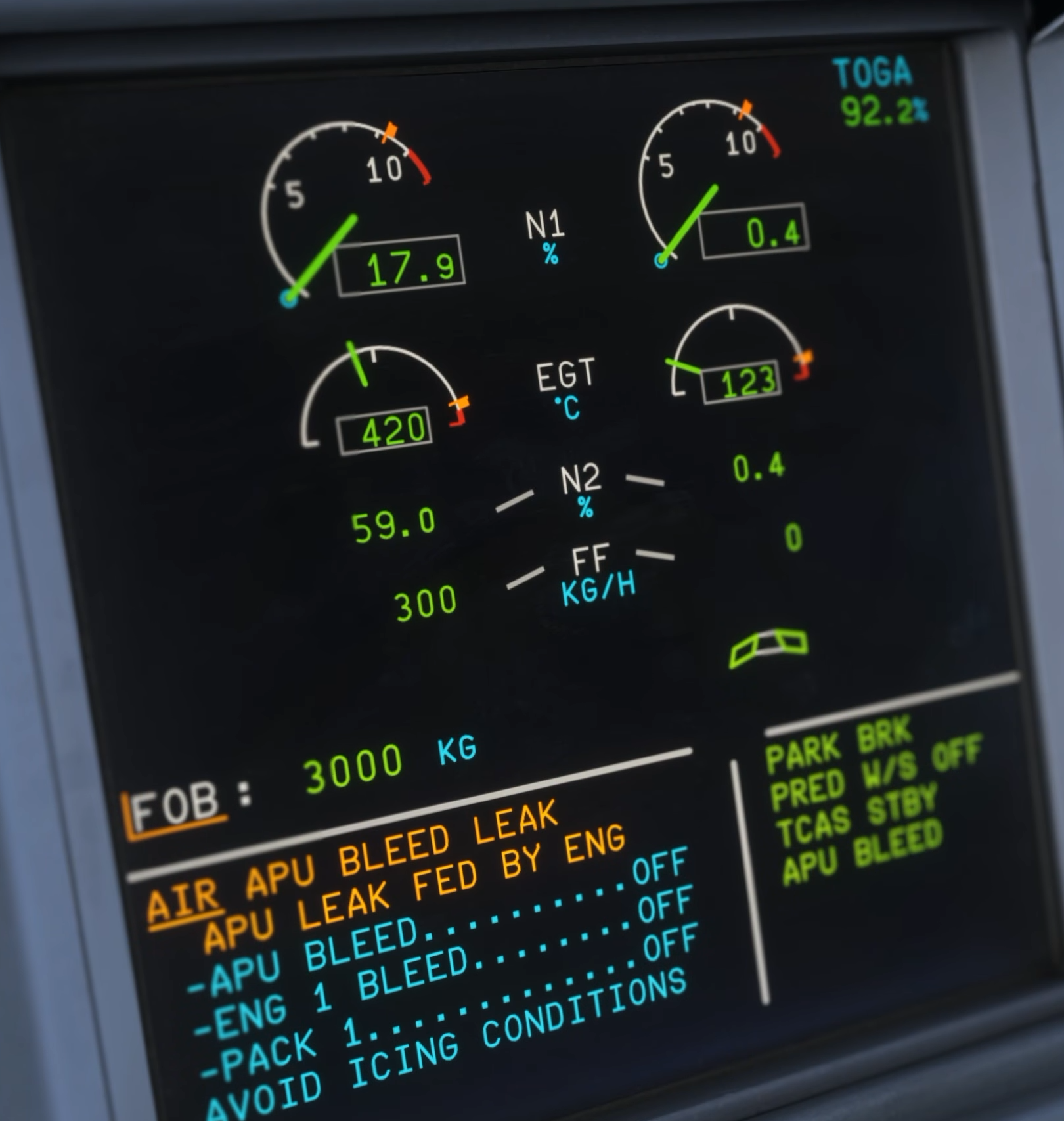
Original Fenix V3 warning-system demonstration: AIR APU BLEED LEAK appears in the E/WD. [82, Source illustration]