DUPLICATE NAMES: SELECT THE GEOGRAPHIC OBJECT, NOT THE NEAREST TEXT
DUPLICATE NAMES appears automatically when an entered identifier matches more than one navigation object. The list can contain waypoints, navaids or pilot-stored entries with the same visible name. Selection therefore means choosing a specific object, not confirming the spelling. Its coordinates, distance and, where applicable, frequency form the evidence needed to identify the item intended by the route or chart. [66, PDF pp. 466-468]
1. Stop at the selection page. Read the entire candidate line before selecting its LSK. In the cited standard the candidates are ordered by distance from present position, nearest first. That order is a convenience, not a guarantee: the route may require a distant fix while a local navaid happens to share its identifier. If position is invalid, distance may be dashed. [66, PDF pp. 466-468]
2. Match location and object type. Compare the latitude/longitude and regional context with the actual intended chart or OFP. A displayed frequency identifies a navaid candidate and can help distinguish it from an identically named fix. Coordinates rounded for the list can be less precise than a definition page, so use further lookup where needed rather than treating a close rounded value as definitive. [66, PDF pp. 466-468]
3. Select the intended candidate. Use the adjacent key only once its identity is understood. Then inspect the page to which the MCDU returns and the actual inserted object. In a route revision, examine the ND geometry and the resulting distance. A large unexpected turn or thousands of miles of extra route is a strong reason to cancel the proposal and reconsider the candidate. [66, PDF pp. 466-468]
4. Handle interrupted selection. The guide describes page reversion if competing revisions affect the same flight plan while disambiguation is open. Re-establish the current page and revise point before retrying. Do not press the previously remembered LSK after a page change; its meaning may no longer be the candidate you were reading. Finish one identity decision before starting another edit on the other MCDU. [66, PDF pp. 466-468]
5. Recover with evidence. Before insertion, erase the incorrect proposal; afterwards make a specific repair from the intended route. Inspect downstream legs and restrictions affected by any shortcut or stringing. Record the correct coordinates or object type in the study notes when an identifier repeatedly causes confusion. The useful lesson is how the right candidate was established, not which row happened to be nearest on one flight. [66, PDF pp. 466-468]
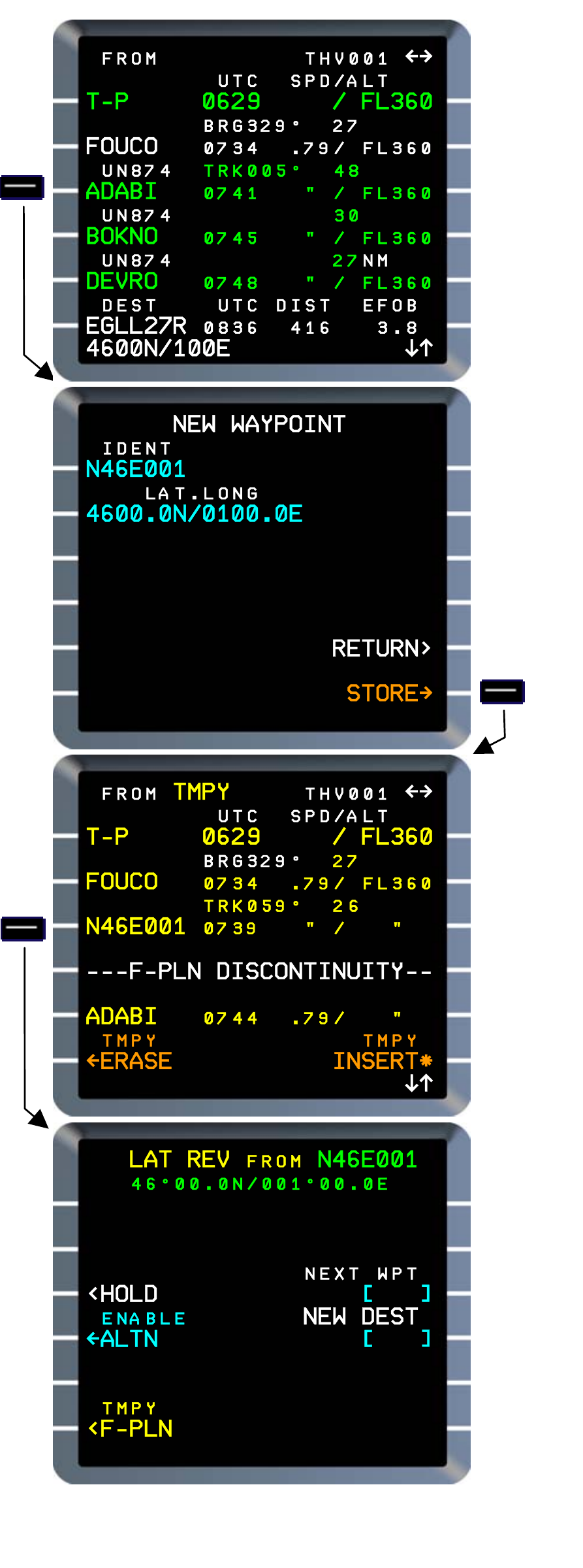
Manufacturer reference: full latitude/longitude definition and shortened waypoint identity in Thales FMS2 REV1. Example coordinates are not a current aircraft position. Fenix V3 NEW WAYPOINT capability is corroborated separately. [66, PDF p. 652]