THE PROGRAMMING CONTRACT: DATA, TRAJECTORY AND GUIDANCE
The PRO workflow has three distinct results: accepted data, a constructed trajectory and the guidance actually in use. A successful line-select action establishes only the first. The map may expose an unintended connection; the FMA may show a selected mode that does not follow the programmed vertical profile. Work through all three before calling a modification complete. This applies just as much to one revised constraint as to an entirely imported route. [66, PDF pp. 71-83,305-315] [21, PDF pp. 51-64]
1. Establish the object being edited. Read the page title and identify ACTIVE, TMPY or SEC before touching a field. Check the sector and revise point. On a moving aircraft, allow for waypoint sequencing while the page is open. A left/right LSK address refers to the current displayed line, not a permanently assigned waypoint. Use the dedicated revision page when it keeps the intended fix positively identified. [66, PDF pp. 71-83,305-315] [21, PDF pp. 51-64]
2. Establish the authority and intended effect. Write down the cleared route or requested change in operational terms before translating it into keystrokes. A new direct clearance, an alternative runway prepared in SEC and a monitoring reference on PROG are different objects. The correct keyboard operation follows that distinction. Avoid selecting whichever function happens to produce a similar-looking line on the map. [66, PDF pp. 71-83,305-315] [21, PDF pp. 51-64]
3. Make a bounded edit. Enter one understood revision, then inspect the resulting field, leg sequence and proposed path. If the edit creates TMPY, the active flight continues under the existing plan until insertion. That separation is valuable, but it also means a satisfactory yellow preview is not evidence that the new route is already being flown. Keep the proposal and working plan conceptually separate. [66, PDF pp. 71-83,305-315] [21, PDF pp. 51-64]
4. Commit and verify. After INSERT, read the active FROM/TO relationship, the next legs, the ND path and the FMA. Confirm the present vertical/speed targets and any restriction affected by the edit. A lateral shortcut can remove constrained waypoints or change the descent distance. The final verification therefore includes more than the line directly changed by the keyboard operation. [66, PDF pp. 71-83,305-315] [21, PDF pp. 51-64]
5. Record a useful completion point. State what is active, what is being flown and what remains prepared for later. For example, the intended route may be active while heading guidance still flies a radar vector. That is a legitimate understood state. The exercises in this chapter use the supplied Thales standard for detailed mechanics; option-dependent or unverified Fenix details are identified rather than inferred from a similar Airbus display. [66, PDF pp. 71-83,305-315] [21, PDF pp. 51-64]
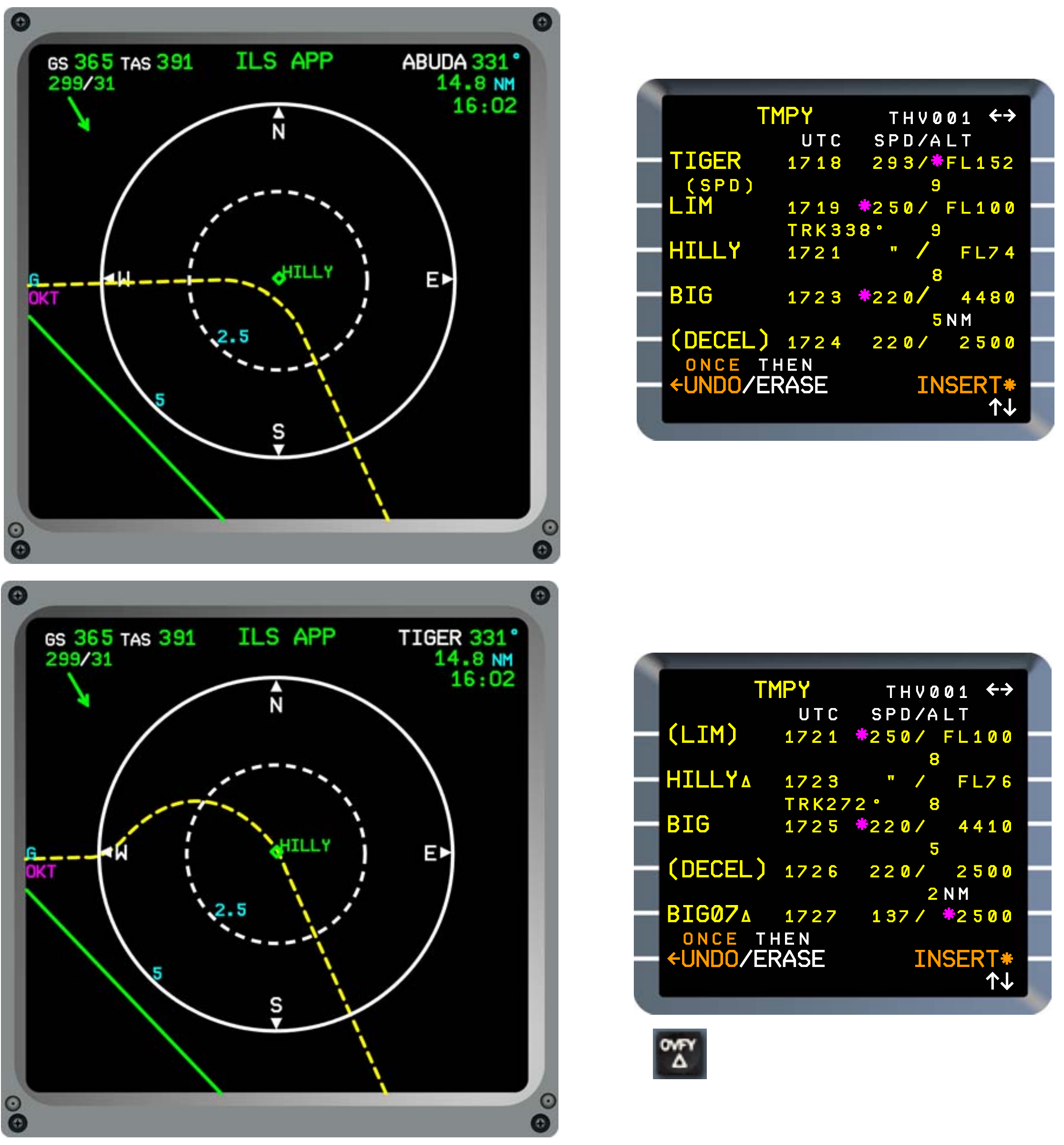
Manufacturer reference: complete ND and temporary-plan panels comparing the source bypass and overfly revisions at HILLY. Identified Thales FMS2 REV1 standard; historical identifiers and predictions. [66, PDF p. 312]