EXTERNAL POWER: AVAILABILITY AND ACTUAL SUPPLY
External power can supply the aircraft while the engines are stopped. On the electrical panel, AVAIL indicates that suitable power is connected and available; selecting EXT PWR requests its use. Keep those states distinct when coordinating a ground-power connection or investigating a powered cockpit whose supply is not what you expected. [62, PDF pp. 4, 6]
Use ECAM ELEC to follow the selected source to the supplied buses. Inspect the AC and DC distribution and associated conversions at the level needed for the current task. The useful crosscheck is the whole supply path: source available, intended source connected, expected buses supplied. A single illuminated pushbutton establishes only part of that picture. [62, PDF pp. 2–8]
Set BAT 1 and BAT 2 to AUTO as required, inspect their indications and establish the intended main supply. The batteries support specified functions and transitions; they are not the routine source for an indefinitely powered flight deck at the gate. Allow the displays and computers to complete their startup before treating a transient indication as an established fault. [62, PDF p. 5] [59, PDF p. 4] [23, PDF p. 1024]
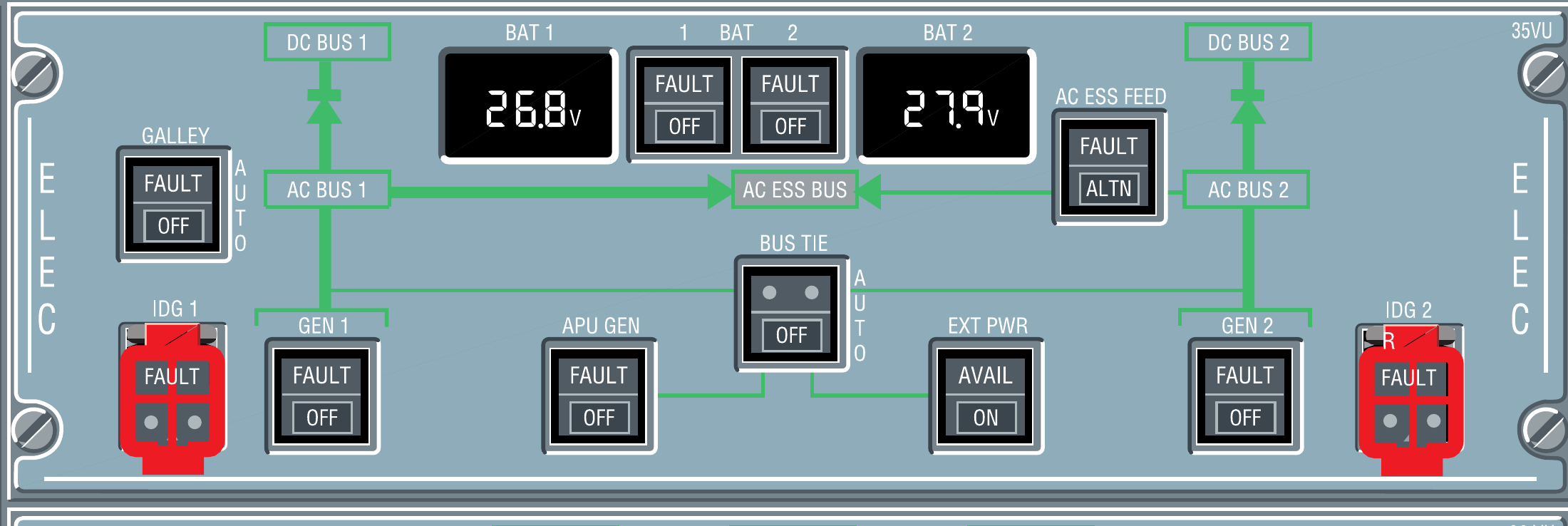
BAT 1, BAT 2, APU GEN and EXT PWR in the original overhead reference. [63, PDF p. 1]
IN PRACTICE: External power: availability and actual supply
Before you begin: Initial control checks complete. The aircraft is parked and a simulated ground-power service is available. Use a stable supply for the following preparation.
1. Connect the ground source
Action. Use the chosen Fenix ground-service workflow to connect the ground-power unit. Wait for EXT PWR AVAIL on the overhead before selecting it.
Check. The aircraft recognises an acceptable external source. A visible vehicle or cable has been followed by the aircraft’s own availability indication. [23, PDF pp. 988-999] [62, PDF pp. 7-9]
2. Select the normal battery state
Action. Set BAT 1 and BAT 2 to their normal AUTO selection and inspect the available voltage/charging indications. If the starting state has a battery-related fault, resolve that state through the appropriate current procedure.
Check. The normal battery selection and indications are established without adopting an arbitrary voltage limit from an unrelated example. [23, PDF pp. 988-999] [62, PDF pp. 21-22]
3. Select external power
Action. With AVAIL present, select EXT PWR ON. Observe the change in the pushbutton indication and the appearance of powered equipment.
Check. The source has been selected and the aircraft begins receiving power. Availability and selection have been distinguished. [23, PDF p. 989]
4. Trace the electrical supply
Action. Call the ECAM ELEC page. Identify EXT PWR and follow the displayed connection to the AC distribution, then inspect the associated DC/battery indications and any abnormal flags.
Check. The distribution page confirms which source is actually supplying the aircraft; screen illumination is only part of that confirmation. [62, PDF pp. 2-5] [62, PDF pp. 7-9]
5. Wait for usable equipment
Action. Allow the normal display/computer initialization to finish. If a MCDU PLEASE WAIT message is present, wait for it to clear before starting data entry, then continue the preparation.
Check. The equipment is ready for the next task. A running initialization sequence has not been disturbed by repeated selections. [23, PDF p. 1022]
Complete when: External power is connected and selected, the distribution page confirms actual supply, and the aircraft has completed its normal power-up sequence.