SIDESTICK FAULT OR AN AUTOPILOT THAT WILL NOT STAY ENGAGED
For F/CTL L/R SIDESTICK FAULT, check axis assignments and observe their response in the Fenix control-configuration sidestick page. Fenix identifies keyboard flight-control input, nullzones and bad or dirty sensors as possible contributors. If raw input jitters with the stick untouched, investigate the device before changing flight-model settings. [64, Controls Config page2; input assignments, keyboard and sensor noise]
If the autopilot drops when you select a camera view, inspect that button for another flight-control command. Fenix specifically documents this conflict. Also check separate AP-off assignments on other devices. Remove the conflicting input and repeat the camera action. Distinguish an input-triggered disconnect from an aircraft engagement condition that has not been met. [65, Conflicting numpad view/flight-control bindings; hardware calibration]
Record when the event occurs, what was pressed, the received input and the aircraft state. A useful next experiment distinguishes two explanations instead of simply making the controls less responsive. This method applies the vendor's documented input-fault checks. [64]
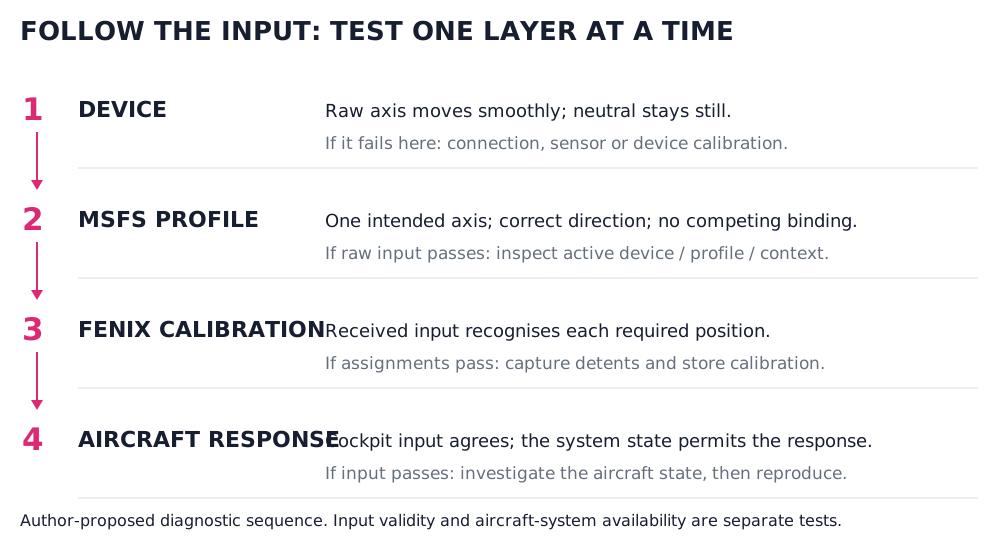
Trace one input through hardware, the simulator profile, Fenix calibration and the permitted aircraft response. Original diagnostic diagram, not a simulated panel. [56, Setup tasks; author-proposed diagnostic sequence] [58, Setup tasks; author-proposed diagnostic sequence] [59, Setup tasks; author-proposed diagnostic sequence]