WIND PROFILES: MANUAL ENTRY, UPLINK AND UPDATE COMMITMENT
Wind preparation affects the predicted trajectory and fuel/time picture. A vertical profile of true-referenced winds is a different input from magnetic runway/approach wind. Access paths also depend on the flight-plan and phase state. The supplied Thales guide documents UPDATE INSERT/CANCEL behaviour, history winds and phase-based restrictions; those detailed options must be matched to the actual Fenix implementation rather than assumed from an older screenshot. [66, PDF pp. 411-419,543-550]
1. Identify which plan and phase are being updated. Use the actual WIND access from INIT, DATA or VERT REV. Read ACTIVE versus SEC and CLIMB, CRUISE or DESCENT. Resolve an existing TMPY when it prevents access. The winds associated with the spare plan are not automatically the winds being used by the working plan, and a wind update has its own commitment state. [66, PDF pp. 411-419,543-550]
2. Enter the profile with its reference. The source's layered format is direction/speed/altitude with true direction and displayed altitude/FL conventions. Its 320/040/FL300 is an example from the manual, not current forecast data for this sector. Populate actual levels from the flight's forecast and inspect the sorted order, direction and units. An accepted wind at the wrong level can alter predictions plausibly rather than generate an obvious error. [66, PDF pp. 411-419,543-550]
3. Inspect the whole proposed wind update. The standard can collect changes across phase pages before a global UPDATE INSERT. CANCEL and INSERT therefore apply to the pending wind changes, not merely the last number viewed. Review other edited phase pages before commitment. HISTORY WIND reuses measured information from an earlier flight only when it is suitable; stored history is not a forecast for today's return sector. [66, PDF pp. 411-419,543-550]
4. Keep approach wind separate. PERF APPR labels MAG WIND in the cited standard, with conversion into the descent ground-wind representation. Read those labels rather than copying a true forecast direction blindly into the magnetic field. A destination change can remove descent/alternate wind data. Review it again with the new airport and phase instead of assuming the old profile survives unchanged. [66, PDF pp. 411-419,543-550]
5. Respect phase-dependent editability. The old guide locks descent-wind editing after DES begins and describes separate uplink availability/acceptance rules. If the loaded Fenix differs, record its actual supported behaviour; do not invent a hidden override or change the flight phase solely to unlock a weather field. Finish forecast preparation early, then monitor measured conditions and the resulting trajectory during flight. [66, PDF pp. 411-419,543-550]
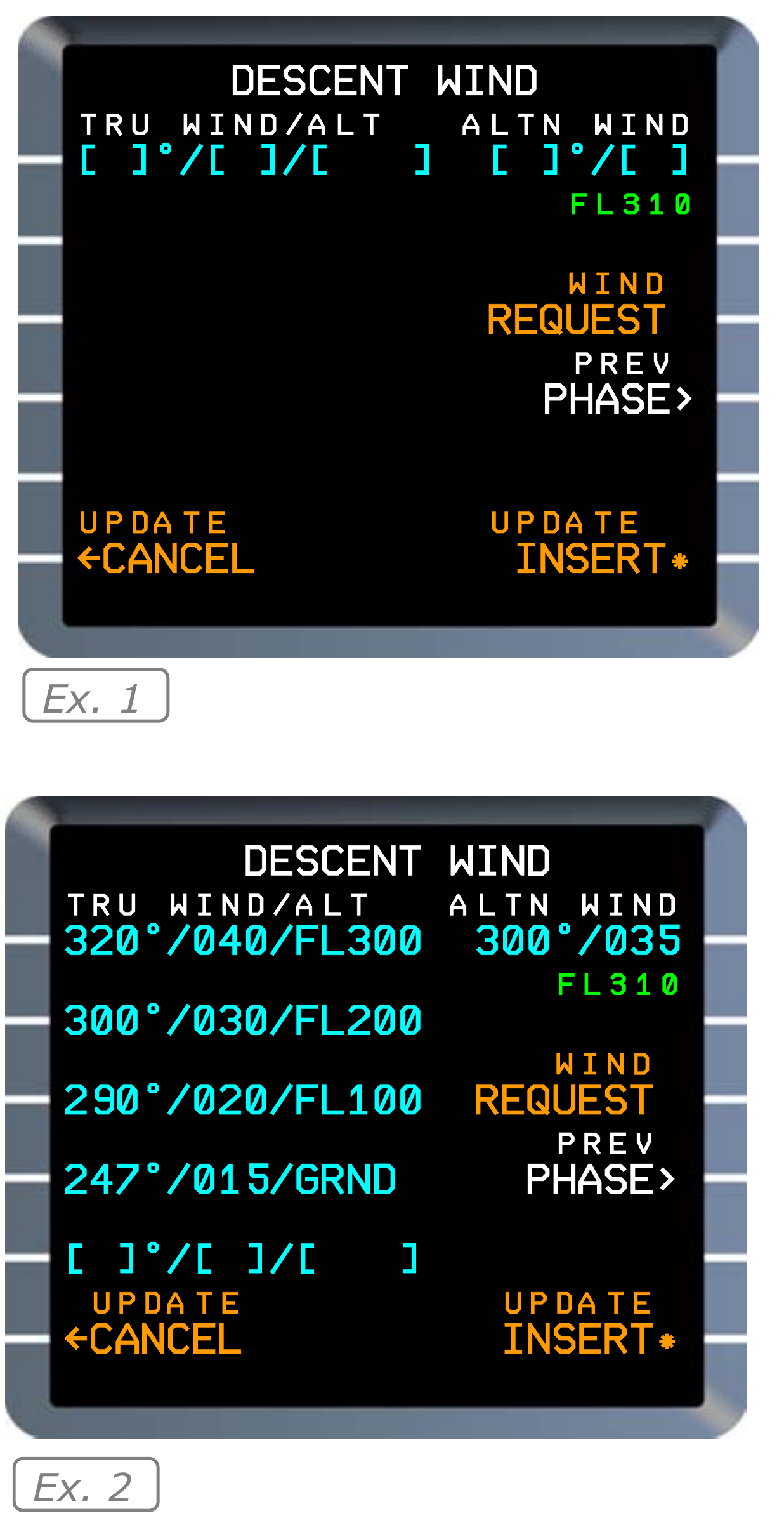
Manufacturer reference: descent-wind fields before entry and after a sample profile has been entered. Complete panels from Thales FMS2 REV1; apply the V3 entry/readback discussion in the text. [66, PDF p. 418]
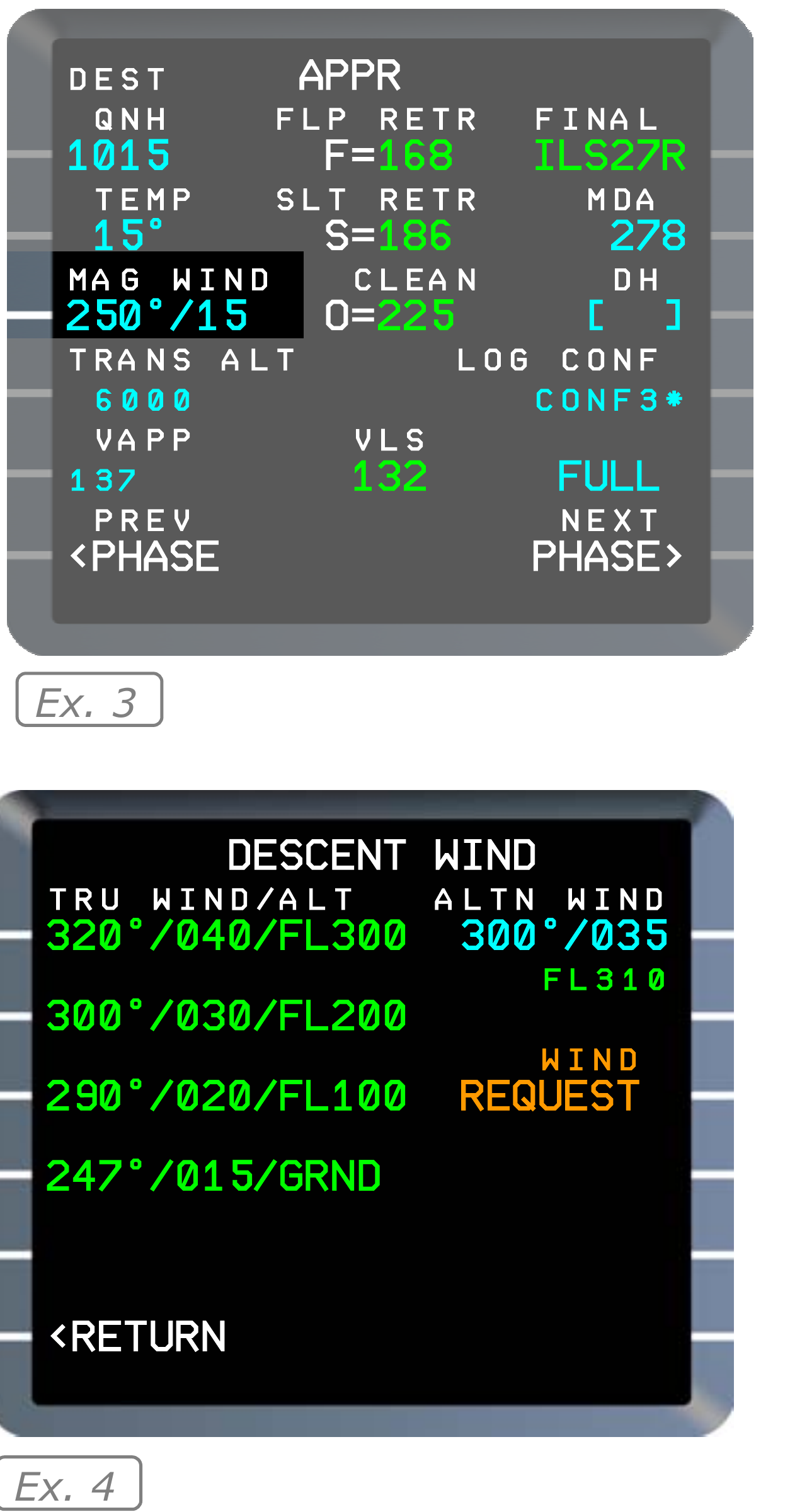
Manufacturer reference: the APPR wind field and the descent-wind display after the source-standard phase transition. Original example values; phase-dependent behaviour is qualified in the V3 discussion. [66, PDF p. 418]