PERF APPR: PRESSURE, TEMPERATURE, WIND, MINIMA AND CONFIGURATION
PERF APPR brings the destination's atmosphere, approach reference and landing configuration into the flight-management calculation. It does not set the physical altimeters or select a landing clearance. Use current destination weather and the actual charted approach. After a runway, airport or landing-configuration change, revisit the affected entries instead of assuming that all stored values remain current merely because they are still displayed. [66, PDF pp. 205-207] [23, PDF pp. 1087,1089]
1. Enter destination QNH and temperature. Confirm pressure units and the displayed field before insertion. The source accepts the applicable hPa/inHg convention; read the actual aircraft configuration. QNH entered here supports the FM calculation. Setting and cross-checking the actual altimeters remains a separate action at the appropriate transition in the descent procedure. One does not silently accomplish the other. [66, PDF pp. 205-207] [23, PDF pp. 1087,1089]
2. Enter the correct wind reference. The cited APPR page labels MAG WIND, while layered forecast winds use true direction. Use the appropriate converted/reported source and inspect direction/speed after insertion. Ground wind can affect the computed approach-speed arrangement. Do not treat an old weather example or a forecast at cruise level as today's runway wind simply because the numeric format fits. [66, PDF pp. 205-207] [23, PDF pp. 1087,1089]
3. Read TRANS ALT correctly. It is transition altitude, with a database/default value where available, not the descent transition level. The crew still applies the current transition-level and pressure-setting procedure operationally. If changing the field, verify the intended altitude reference and source. A chart value and an ATIS transition level can both be correct while belonging to different parts of that process. [66, PDF pp. 205-207] [23, PDF pp. 1087,1089]
4. Set the actual minima representation. Match MDA/MDH, BARO/DH or the displayed supported labels to the approach, chart reference and installed equipment. The old guide's radio-DH and barometric-minimum options do not justify putting an altitude into a height field. Inspect which minimum remains active after insertion: the source describes mutual replacement between certain entries. Use the current operational minimum, not the source screenshot's number. [66, PDF pp. 205-207] [23, PDF pp. 1087,1089]
5. Verify configuration and speed. Select the intended FULL or CONF3 reference and review VLS/VAPP and their basis. If an override is justified, use the applicable procedure and read it back against actual mass, conditions and landing-performance preparation. The computed value is not a substitute for that preparation. A later configuration or weather change requires the related speed and distance assumptions to be reviewed again. [66, PDF pp. 205-207] [23, PDF pp. 1087,1089]
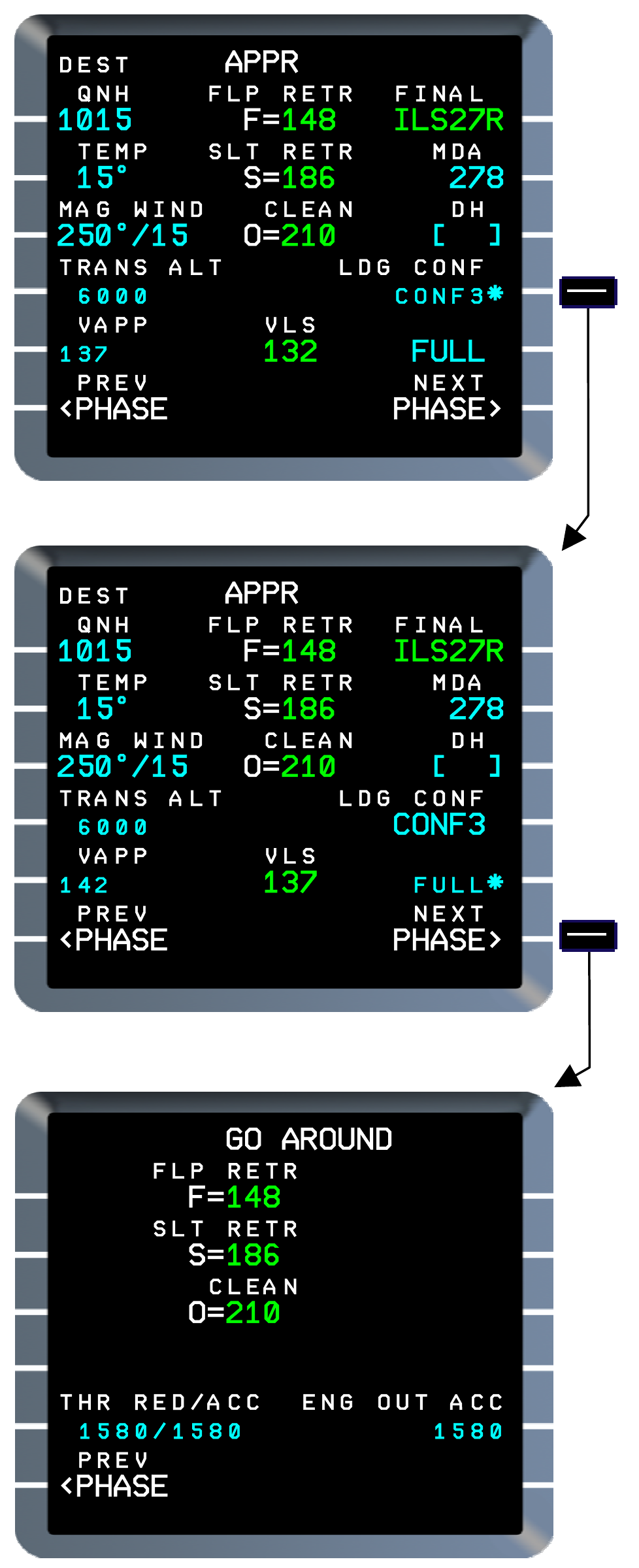
Manufacturer reference: approach-minimum/configuration options and go-around preparation in Thales FMS2 REV1. Displayed minimum values, altitudes and page options are source examples; use current charts, equipment and V3 fields. [66, PDF p. 207]