ALTITUDE CONSTRAINTS, WINDOWS AND THEIR DELETION CONSEQUENCES
Altitude programming must preserve the distinction between AT, AT OR ABOVE, AT OR BELOW and a coded altitude window. The source standard lets the pilot enter the first three, while a window is provided through a coded procedure. The predicted altitude at a fix is a result of the profile and may differ from the stated constraint. Read VERT REV before deciding what needs correction. [66, PDF pp. 404-410]
1. Identify the fix and segment. Open its vertical revision and read ALT CSTR. Confirm climb/descent context and whether the fix lies in a protected approach segment. The source can ask CLB or DES where it cannot resolve the intended application. Select the actual intended segment; choosing whichever option removes a message does not establish the required profile. [66, PDF pp. 404-410]
2. Use the sign deliberately. The guide's entry examples use an unsigned altitude/flight level for AT, a plus sign for AT OR ABOVE and a minus sign for AT OR BELOW. Its 80 example represents FL080 in that context. Treat such numbers as syntax exercises, not assignments for EDDF-EGLL. Read the full accepted altitude/FL and condition rather than assuming the entered digits retained their intended reference. [66, PDF pp. 404-410]
3. Inspect the prediction and mode. Check the resulting altitude error or constraint marker and ND path. In the documented standard, managed CLB/DES considers the relevant restrictions while OP CLB/OP DES does not enforce them as managed constraints. An acceptable coded restriction cannot compensate for the wrong active mode. The FCU clearance limit remains a separate boundary in the vertical-guidance decision. [66, PDF pp. 404-410]
4. Preserve window meaning. A database window contains both upper and lower limits. Replacing it with a pilot AT/above/below entry changes the requirement represented by the system. Do not simplify the window merely because a single number is easier to type. If the actual clearance changes it, make the justified revision and inspect the new profile and remaining constraints together. [66, PDF pp. 404-410]
5. Review deletion side effects. The source says deleting a constraint does not restore a previous database default automatically, and deleting a constraint associated with a defined path angle can also remove that angle. A CLR on a combined vertical row can remove all vertical constraints. After deletion, inspect the full affected vertical segment and final-approach structure instead of assuming only the troublesome number disappeared. [66, PDF pp. 404-410]
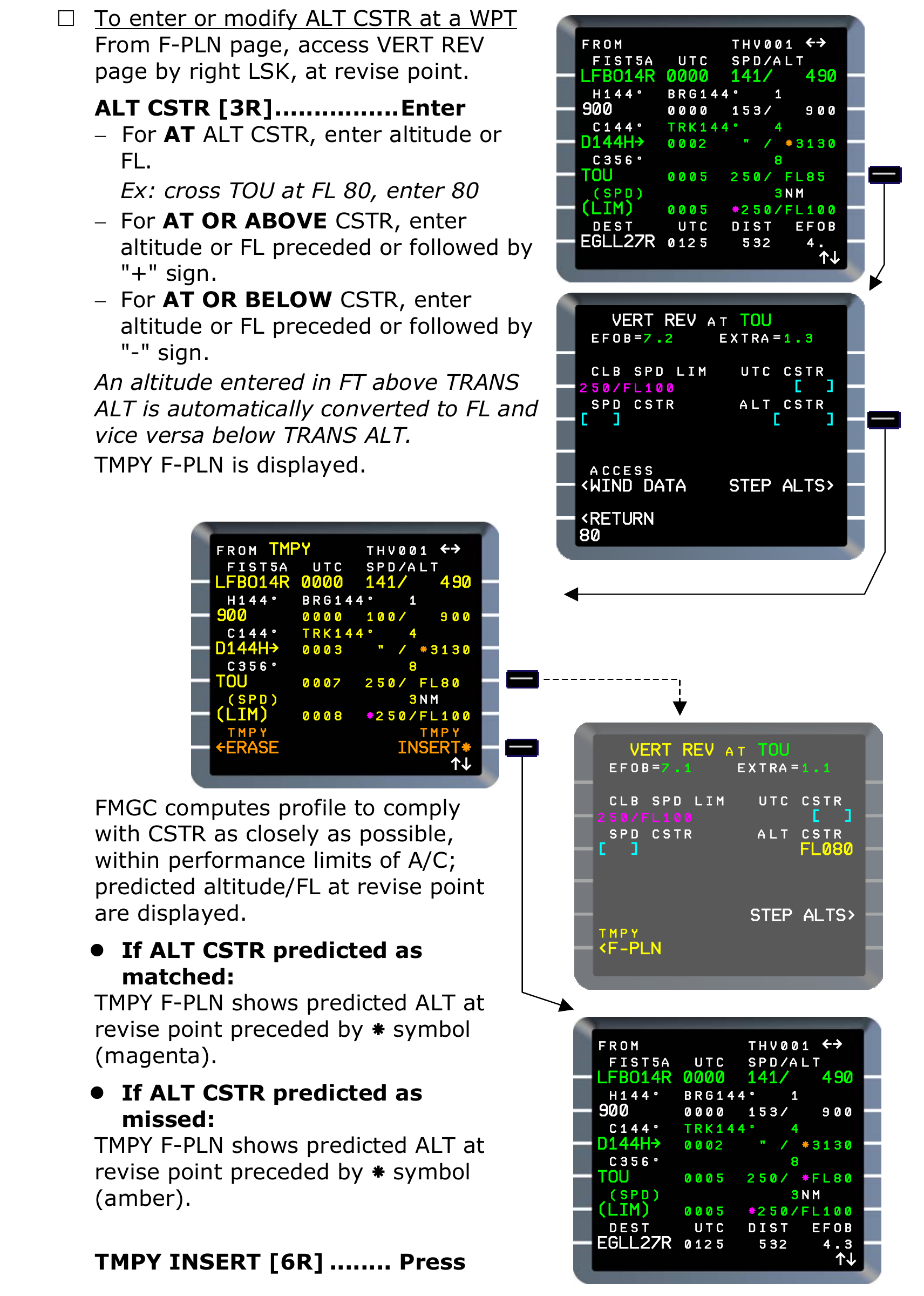
Manufacturer reference: altitude-constraint entry, temporary route and prediction markers in Thales FMS2 REV1. The FL080/TOU example is historical teaching data, not an EDDF-EGLL clearance or universal current field rule. [66, PDF p. 405]