AFTER START: FUEL PRED, GROSS-WEIGHT CORRECTION AND SENSOR LABELS
After engine start, the relevant interface changes. INIT B is no longer the place to repair a missed mass entry; the source routes gross-weight/CG work through FUEL PRED. Read what the live page actually accepts. A value valid as zero-fuel mass before start is not automatically the correct gross weight later, because usable fuel and consumption now form part of the current aircraft mass. [66, PDF pp. 136,181,443-447,617,622]
1. Establish the current mass reference. Open FUEL PRED and identify GW/CG and FOB. Reconstruct current gross weight from the correct loadsheet/loading information and actual fuel state, accounting for consumption as appropriate. The 66.0-tonne stand figure in our example is an earlier state, not a number to re-enter repeatedly after fuel has been used. Reconcile the current moment before making a correction. [66, PDF pp. 136,181,443-447,617,622]
2. Correct the intended field only. If a genuine input error is established, use the accepted current field and grammar, then inspect the resulting mass and predictions. If the system reports INITIALIZE WEIGHTS, determine which required input is missing. Do not use a database swap or engine shutdown simply to recreate an earlier page when the documented current-phase interface supplies the required function. [66, PDF pp. 136,181,443-447,617,622]
3. Read the actual FOB source information. The manufacturer model distinguishes fuel-flow and fuel-quantity contributions. These are information sources, not additional reserves or tanks. Its diagrams explain how a computed FOB can depend on more than one measurement. Read any actual source annotation displayed in the loaded V3 aircraft and keep that evidence separate from the manually entered flight-planning assumptions. [66, PDF pp. 136,181,443-447,617,622]
4. Keep sensor intervention outside routine programming. The manufacturer guide contains optional source-selection and manual-overwrite mechanics; this manuscript does not publish those unverified entry sequences as V3 operating tips. For an ordinary sector, retain the normal reliable sensing arrangement. A discrepancy calls for comparison of actual quantity, loading and consumption, with a current applicable procedure if a real sensor problem is being simulated. [66, PDF pp. 136,181,443-447,617,622]
5. Follow a CHECK GW discrepancy to its cause. Compare the FMS mass with an independently reconstructed current mass and inspect original inputs. A dismissed message can recur if its condition persists. Record any deliberate correction and repeat the speed/performance review affected by it. The completion point is an explainable current mass and prediction basis, with the loading, sensing and manual-entry contributions clearly distinguished. [66, PDF pp. 136,181,443-447,617,622]
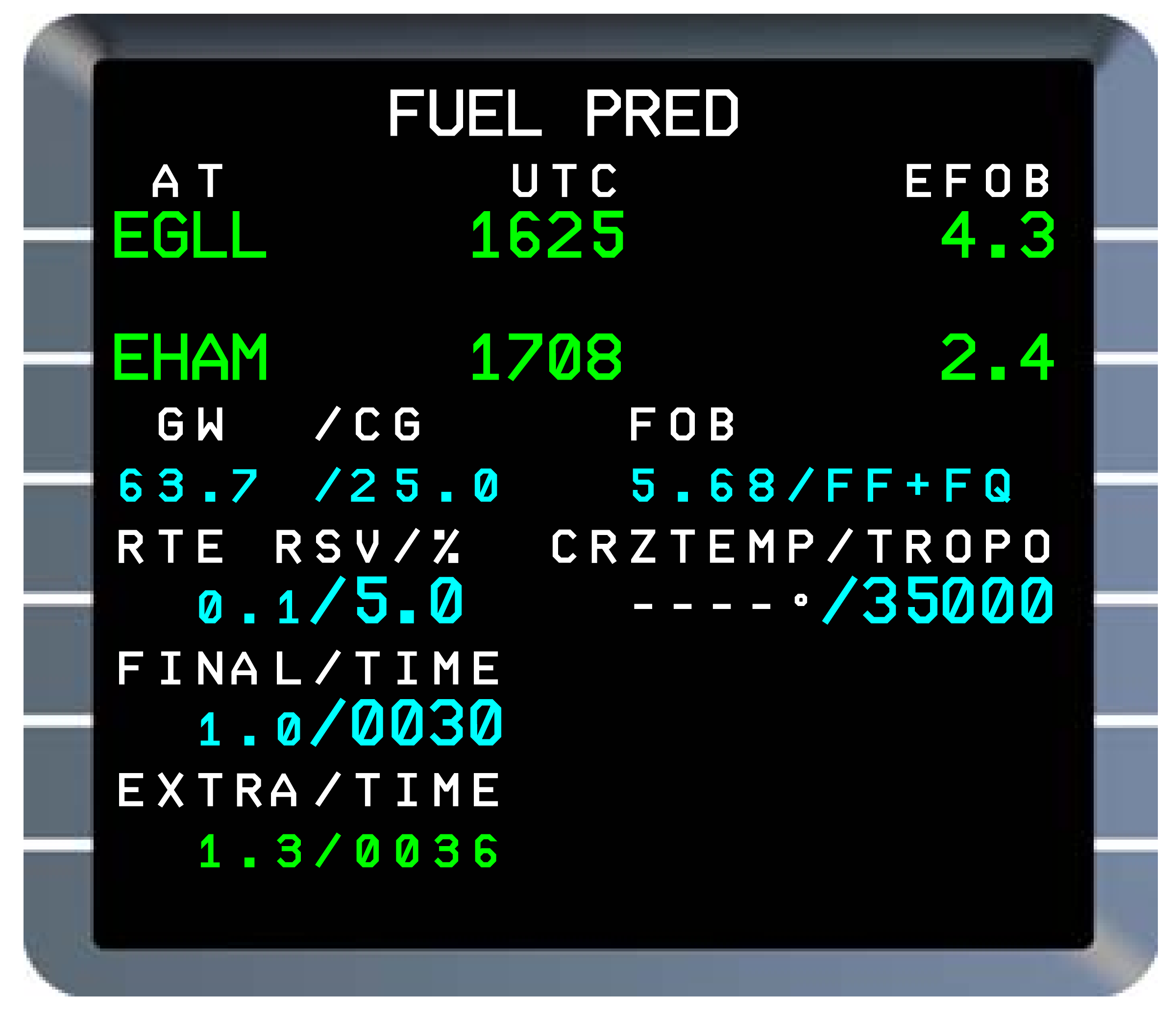
Manufacturer reference: normal FUEL PRED display in Thales FMS2 REV1. The EGLL/EHAM figures, reserve assumptions and FF+FQ annotation are historical source examples, not this flight's actual fuel state or a V3 sensor-intervention procedure. [66, PDF p. 443]