INIT A: IDENTITY, PLANNING ASSUMPTIONS AND POSITION
INIT A is the first initialization page. It gives the preparation a flight identity and some essential planning assumptions. Begin with EDDF/EGLL in FROM/TO: Frankfurt as departure, Heathrow as destination. The slash separates the two airport codes. After selecting the receiving field, read the accepted pair. A valid code will be accepted even when it is the wrong airport, so the readback still has a job to do. [26, PDF pp. 102-112]
For this exercise add MC2026 as FLT NBR and EGKK as the alternate. The flight number identifies our sector; the alternate is a separate planning entry. If a stored company route is offered, inspect what it contains before selecting it. Selecting a route can save typing, but we will still check the actual legs later. At this stage we want a correct identity, not a screen filled as quickly as possible. [26, PDF pp. 102-112]
The cost index, CI, helps determine the economic speed schedule. Our teaching value is 20. It is one planning input among several; the actual managed speeds also depend on the flight and aircraft conditions. Enter the value for the case you are preparing and inspect what the MCDU accepted. We will use the performance pages to see more of the resulting picture. [26, PDF pp. 102-112]
For the planned cruise level, the exercise types 280 into CRZ FL/TEMP and checks the displayed FL280. The level is part of our plan; the clearance determines what level we may actually use. Cruise temperature, when entered, comes from the flight's weather information. Keep those sources clear rather than borrowing the temperature or clearance altitude visible in an illustration. [26, PDF pp. 102-112]
Position initialization also belongs to this preparation. The inertial reference systems, or IRS, need a credible starting position and a stationary aircraft while aligning. The airport reference point and our parking stand need not be the same location. We therefore compare the position used by the loaded aircraft with where the aircraft actually is, instead of accepting the word Frankfurt as the entire check. [26, PDF pp. 102-112]
Use the position/alignment interface provided by the installed Fenix unit. Different standards make a remembered button sequence an unreliable guide; the practical exercise deliberately avoids inventing a modern confirmation prompt from an older illustration. The useful outcome is definite: the sector identity and planning inputs are correct, the position is credible, and alignment completion is checked before we rely on the inertial references. Now the route can be built on that foundation. [26, PDF pp. 102-112]
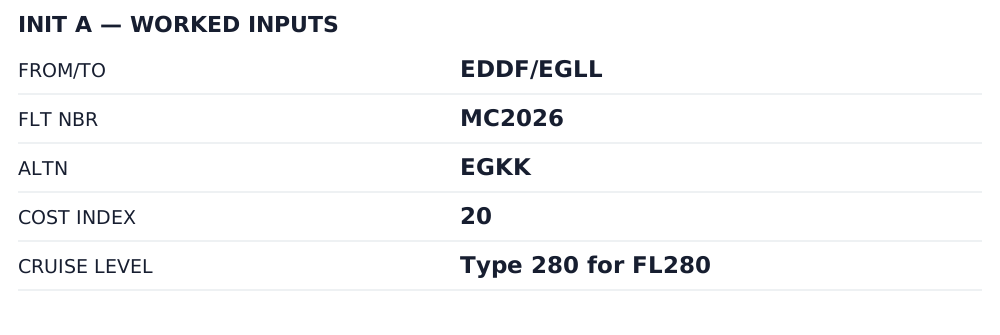
Worked-flight inputs. Enter these in the corresponding INIT A fields; this is an entry worksheet, not a reproduced screen. [26, PDF pp. 102–104]
IN PRACTICE: INIT A: establish the sector
Before you begin: Active navdata checked; aircraft remains stationary. Use the exercise identity or the actual OFP consistently, rather than mixing the two.
1. Enter the airport pair
Action. Press INIT. Type EDDF/EGLL and select FROM/TO. If a route-selection page opens, inspect any offered company route before choosing it; do not accept an unfamiliar route merely because it is available.
Check. The accepted origin is EDDF and destination EGLL. Any selected company route belongs to that pair and still receives a route review. [26, PDF pp. 102-105]
2. Add the flight identification
Action. Enter MC2026 in FLT NBR for the fictional flight. For an actual sector use the intended flight identification from the dispatch information, and read it back after acceptance.
Check. The flight number belongs to this sector. An earlier loaded flight identification has not survived unnoticed. [26, PDF pp. 102-105]
3. Check the alternate
Action. Enter EGKK in the alternate field for this exercise. Review any automatically offered alternate/company-route selection and confirm the resulting airport; the destination and alternate are separate entries.
Check. EGKK is the intended alternate. Its appearance on INIT A does not establish that an appropriate alternate route or fuel plan has already been completed. [26, PDF pp. 102-105]
4. Set the cost index
Action. Enter 20 in COST INDEX for the exercise and read back the accepted value. If using an imported or stored route, check this field explicitly instead of assuming it carries the OFP assumption.
Check. The MCDU cost index agrees with the planning case and will support the corresponding managed-speed calculation. [26, PDF p. 108]
5. Set the cruise reference
Action. Enter 280 in CRZ FL/TEMP for the teaching flight. Read the displayed flight level. Use any separately required cruise-temperature information from the actual weather/flight plan, rather than inventing a temperature.
Check. The cruise reference displays FL280. A flight level and a forecast temperature have not been confused or copied from an unrelated example. [26, PDF p. 108]
6. Verify the position and alignment
Action. Check the initialized position against the actual aircraft location and stand, using the position/alignment interface of the installed Fenix unit. Keep the aircraft stationary during alignment and verify completion before relying on inertial guidance.
Check. The position reference is credible and alignment state is understood. This step does not prescribe an unverified button sequence from a different ADIRS standard. [26, PDF pp. 106-107]
Complete when: INIT A identifies the intended sector, alternate and planning assumptions; the initialized position agrees with the aircraft and alignment has been checked.