MAKING THE CABIN COMFORTABLE, ONE ZONE AT A TIME
The air-conditioning packs process incoming air before it is distributed to the cockpit and cabin. Conditioned air is mixed with recirculated cabin air through the distribution arrangement. This gives us a useful starting point for understanding a temperature problem: there must be an appropriate air supply, the conditioning equipment must be doing its work, and the air must reach the relevant zone. Moving a temperature selector cannot substitute for the missing supply. The airflow illustration lets you follow that chain from the packs through the mixer and towards the occupied areas. [29, PDF pp. 2–5]
The cockpit, forward cabin and aft cabin are separate temperature zones. Forward means towards the nose; aft means towards the tail. Compare each selected temperature with the corresponding indication, and give the aircraft time to respond. A whole cabin does not change temperature as quickly as a number changes on a screen. If a zone is not moving towards the selected condition, first check the available supply and selections. Repeated large adjustments can make the investigation harder because you lose track of which request the system is still responding to. Look for a developing trend rather than an immediate perfect match. [29, PDF pp. 2–3]
Version 3 includes cabin-side temperature interaction through the FAP, the Flight Attendant Panel. Its cabin adjustment is related to the cockpit selection, so the flight crew and cabin crew are working with connected parts of the same system. If you make a supported FAP adjustment, compare it with the resulting temperature information and allow for the response time. A cabin setting deserves to be included when you are trying to understand why the indications differ from your first expectation. The cockpit selector is still important, but it is not the only request that may be relevant. [11]
For the first exercise, choose one cabin zone and follow it from selection to indication. Identify the source of conditioned air, recognise the zone being controlled and watch the change over time. Keep temperature separate from cabin pressure as you do this. A comfortable temperature indication does not establish that the pressure setup is correct, and a normal cabin-pressure trend does not tell you whether the passengers are getting warmer. The next chapter explains that second system. [29, PDF pp. 2–5]
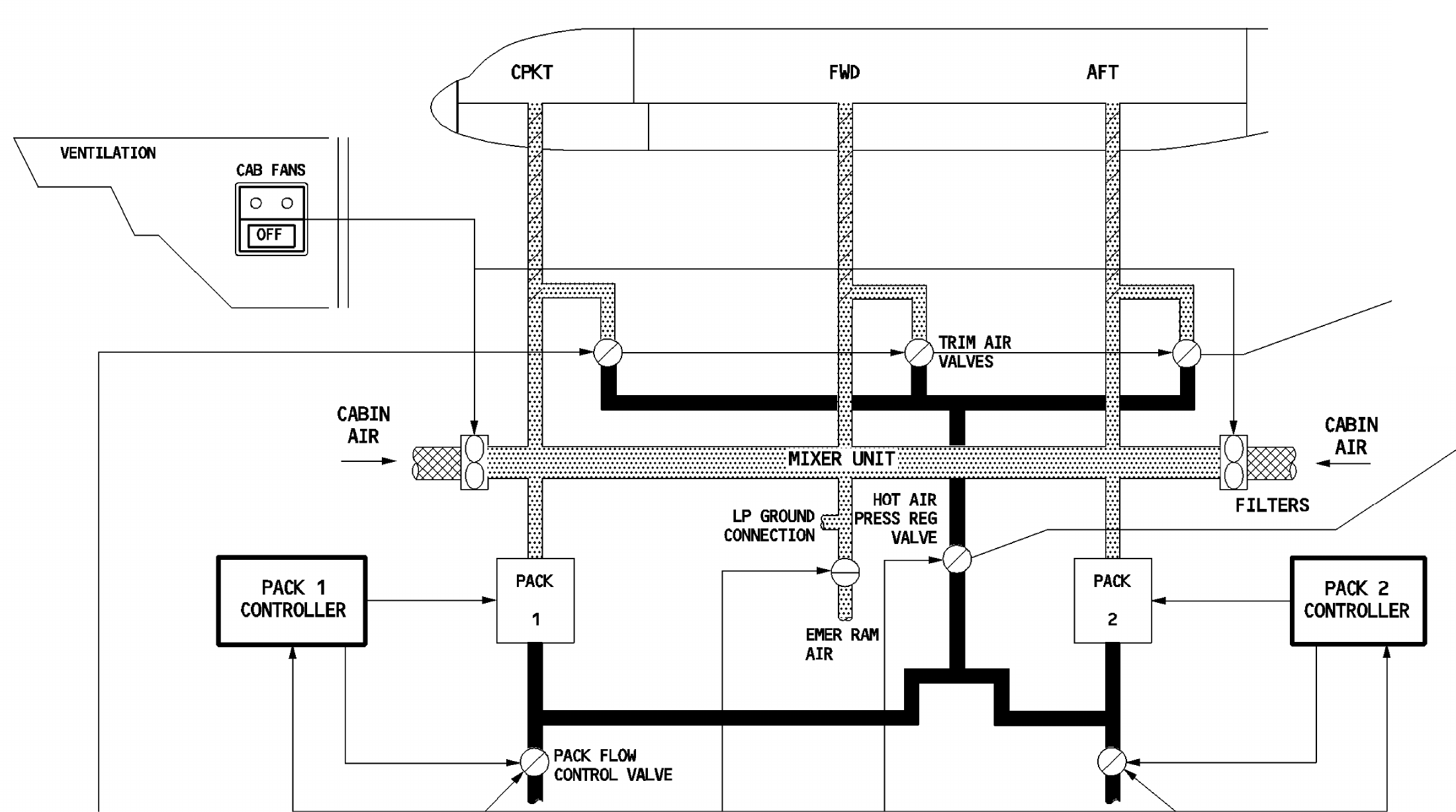
Original A320 airflow detail: pack output, mixer, cabin-air recirculation and trim-air distribution. Thin control/display connections continue outside this detail. [29, PDF p. 3]
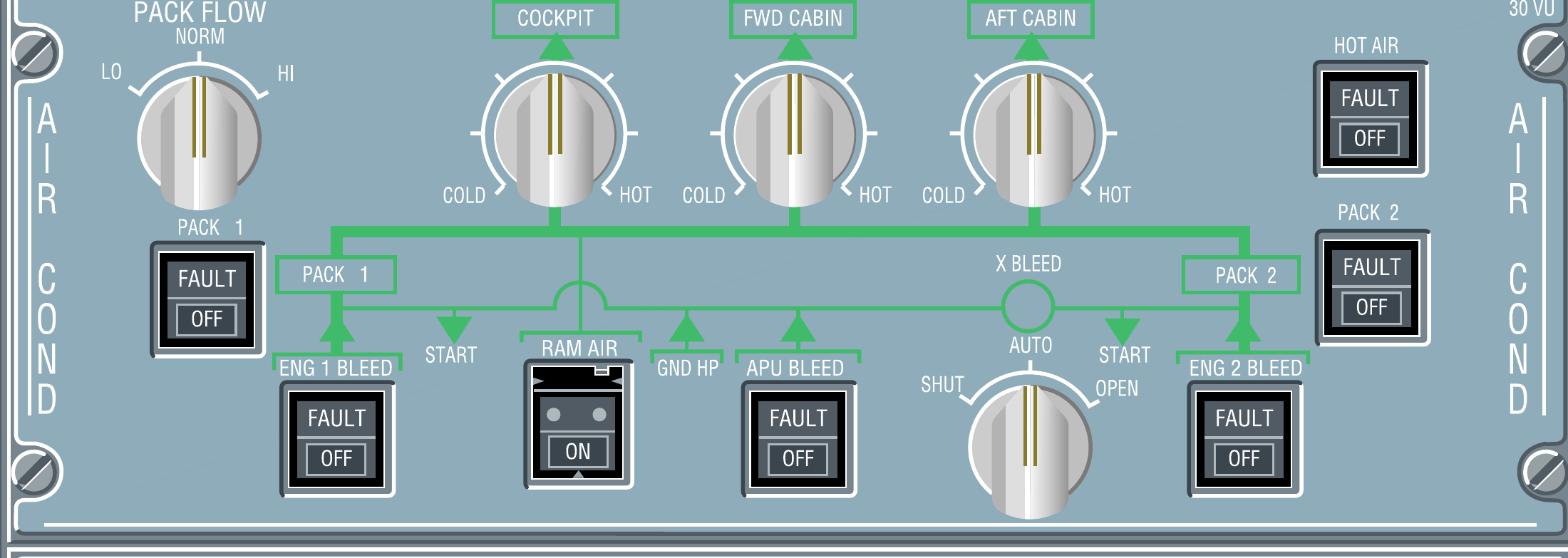
Air-conditioning controls and the three cabin temperature selectors. [23, PDF p. 1]
IN PRACTICE: Condition the cabin and check its response
Before you begin: An appropriate pneumatic/conditioning source is available. Use the stated A320 configuration and the actual cabin loading/environment; do not import a different family member’s panel setting.
1. Confirm the supply before adjusting temperature
Action. Review BLEED and the pack indications. Establish the intended pack supply and normal pack selection before trying to correct a warm cabin with temperature controls alone.
Check. Conditioned-air supply is available and the receiving pack state agrees with the preparation. [29, PDF pp. 2-8] [29, PDF pp. 11-13]
2. Check the appropriate flow setting
Action. On the A320, review PACK FLOW against the planned load and conditions. Read actual pack behaviour with the selected supply; APU supply and start logic can affect what the controller delivers.
Check. The flow selection is intentional, and the actual flow state is interpreted through its control logic rather than as a direct fixed output. [29, PDF pp. 11-13] [14, PDF pp. 1010-1033]
3. Set the zone targets
Action. Set the cockpit, forward-cabin and aft-cabin temperature controls to the intended comfort targets. Review the displayed zone information so each adjustment is tied to the correct part of the aircraft.
Check. The targets are deliberate and the affected zones are identified. A generic photograph’s displayed temperature has not become a mandatory setting. [29, PDF pp. 2-8] [29, PDF pp. 11-13]
4. Observe a measured change
Action. If a zone needs adjustment, make a small deliberate change and give the system time to respond. Compare the subsequent temperature trend with the requested change and the available supply.
Check. You have evidence of the zone response without repeatedly chasing a naturally delayed indication. [29, PDF pp. 2-8]
5. Include cabin-side control
Action. Where the working V3 FAP/cabin setup provides temperature interaction, review its indication alongside the cockpit request. Keep any cabin-side adjustment coordinated with the chosen cockpit target.
Check. The cabin and cockpit settings form one understood temperature-control state. The pressure indication is not being used as a temperature check. [11, Chapters CIDS and FAP] [29, PDF pp. 21-22]
Complete when: The packs and temperature controls have an understood source and a sensible response. Cabin temperature is checked as a trend, separately from cabin pressure.