YOUR CONTROLS, THE COMPUTERS AND THE MOVING SURFACES
Moving the sidestick sends an input into the flight-control system. Computers interpret that input through the applicable control logic and command powered surfaces. This is the basis of fly-by-wire control: the pilot's input and the eventual surface movement are connected through an electronic control system. It helps explain why learning the aircraft involves more than watching a desktop joystick move. The hardware input, the cockpit control, the computers and the actual response all belong to the chain. You will use the flight-control display to see what the aircraft is receiving and doing. [33, PDF pp. 2]
ECAM F/CTL is the flight-control system page. When the appropriate aircraft state has been established, carry out the required control check and observe direction and travel on that page. The check is a comparison between your command and the aircraft's response. If you move your hardware but the expected cockpit control or displayed response does not follow, you have found something to investigate before departure. The physical feel of a joystick cannot establish that the simulator accepted the intended axis or that the powered aircraft surfaces completed the expected movement. [34, PDF pp. 6–7] [14, PDF pp. 1051–1062]
One steering detail is worth meeting before the rudder check. PEDAL DISC is the pushbutton on the steering tiller used to disconnect the pedals' nosewheel-steering input for the applicable check. NWS DISC is a different indication: it concerns nosewheel steering being disconnected, as can be required during ground handling. NWS means nosewheel steering. Read the actual control and indication rather than treating the similar words as the same command. When the ground crew has released the aircraft for taxi, the steering and pin-disconnection checks still have to agree with that release. [13, PDF p. 113] [14, PDF pp. 1048–1053]
Settle duplicated assignments, reversed axes and calibration problems on the ground. Confirm that cockpit control movement agrees with your hardware, then use measured inputs and allow the aircraft to respond during flight. A clean setup makes later observations much more useful. Otherwise, it is easy to blame the aeroplane's handling for an input that is being sent twice or in the wrong direction. When comparing an A319 with an A321, first establish that the hardware is behaving consistently; then you can pay attention to the differences in the aircraft. [35, flight-control calibration procedure]
The first workshop gives each axis its own moment. Make the requested pitch, roll or rudder input, look for the expected response and return the control as instructed before moving to the next item. There is no benefit in moving everything at once while trying to read several indicators. Keep the flight-control check distinct from checks of brakes, steering and the parking brake. They may all involve your hands or feet, but they are answering different questions about the aircraft. [34, PDF pp. 6–7] [14, PDF pp. 1051–1062]
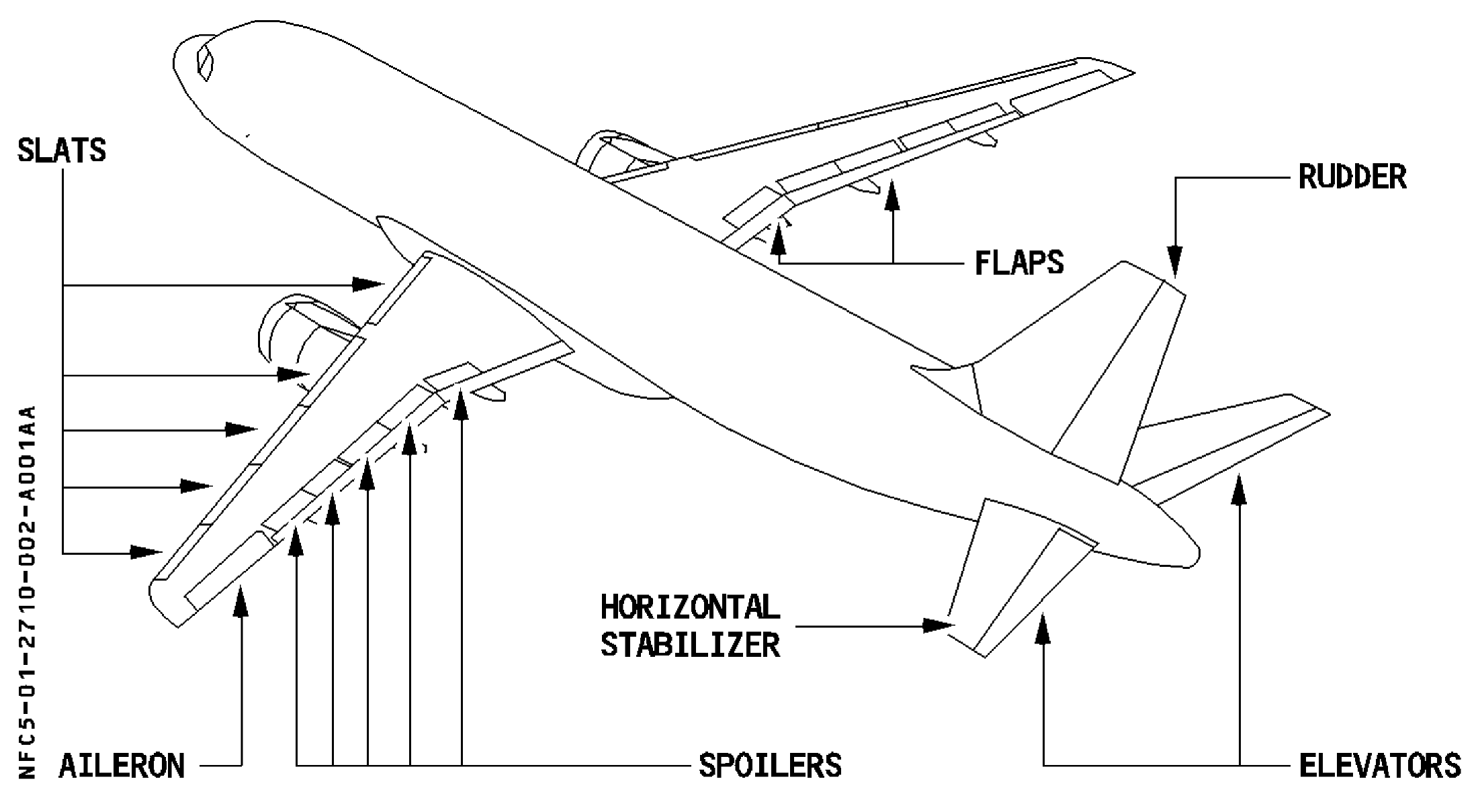
A320 flight-control surfaces in the original airframe drawing. [33, PDF p. 3]
IN PRACTICE: Flight controls: check full travel and sense
Before you begin: Perform at the appropriate after-start/before-takeoff stage with normal hydraulic power, the aircraft secure and the surface area clear. Complete before arming autobrake; use the actual installed controls and bindings.
1. Set up the receiving display
Action. Call the ECAM F/CTL page and confirm the relevant hydraulic/control state. Arrange the view so you can compare your input with the indicated surfaces throughout the check.
Check. The display is usable for a command-and-response check, rather than a brief glance at a page after the controls have moved. [33, PDF pp. 42-43] [14, PDF p. 1052]
2. Check the pitch axis
Action. Apply full aft sidestick, then full forward, then neutral, observing the elevator response and correct sense. Hold each full input long enough for the surfaces to reach their full travel.
Check. Both elevators respond in the correct sense and return with the commanded neutral state; the travel has actually been observed. [14, PDF p. 1052]
3. Check the roll axis
Action. Apply full left sidestick, full right and neutral. Observe the aileron response and appropriate spoiler deflection/retraction on F/CTL while following each command.
Check. The roll surfaces move in the correct sense through the required travel and return appropriately. [33, PDF pp. 8-18] [14, PDF p. 1052]
4. Check the rudder deliberately
Action. Use the installed PEDAL DISC function as required by the control-check procedure, then command full left rudder, full right and neutral. Observe the rudder indication and avoid an unintended nosewheel-steering input.
Check. The rudder follows the intended commands through its travel. The steering arrangement and pedal check are kept distinct. [14, PDF p. 1052]
5. Resolve a disagreement before taxi
Action. If an axis has the wrong sense, an unexplained offset or incomplete travel, inspect the actual hardware binding/calibration and aircraft state before continuing. Repeat the affected check after correction.
Check. The check ends with correct observed response, not simply with the stick and pedals having been moved. [33, PDF pp. 2-6] [36, PDF p. 1]
Complete when: Pitch, roll and rudder responses agree with the commands, full travel and return have been observed, and the controls are left neutral for the next task.