ADIRS: HELPING THE AIRCRAFT ESTABLISH ITS REFERENCES
ADIRS stands for Air Data/Inertial Reference System. The two halves provide different kinds of information. Air data uses pressure and temperature sensing to provide quantities such as airspeed and pressure-derived altitude. The inertial-reference part provides attitude and motion information used by the flight displays and navigation systems. Attitude is the aircraft's orientation, including its nose-up or nose-down tilt and bank. A powered display needs these references before all its indications can become useful. Electricity has switched the screen on; the reference systems still have their own preparation to complete. [25, PDF pp. 3–5]
For normal navigation preparation, identify all three IR, or inertial-reference, selectors and select NAV using the actual installed panel. On the illustrated CDU/keypad panel, the order from left to right is IR1, IR3, IR2. Read the printed unit numbers rather than quietly assuming 1, 2, 3. Keep the aircraft stationary while alignment takes place. Also compare the initial position with the actual stand. An airport's database reference point can be a valid location without being the place where your aircraft is parked. Entering a position and verifying that it is the right position are separate jobs. [25, PDF pp. 6–8] [26, PDF pp. 102–112]
Use the alignment indications and resulting flight-display information to judge completion. A simulator option that shortens alignment changes the time available to you; it does not remove the need for correct position information. The selector's ATT position provides attitude-reference operation for a different situation and does not replace normal NAV alignment. During the normal ground sequence, continue other suitable parked preparation while alignment develops. Return to the references and displays before moving. Familiarity with the expected sequence is more useful than memorising a delay and assuming that everything must then be ready. [25, PDF pp. 6–7]
At Frankfurt, a useful check is to connect three observations: the correct units have been selected, their alignment information makes sense, and the position/reference information agrees with the aircraft you can see at the stand. The overhead illustration tells you where the controls are; the navigation preparation later in the book deals with the corresponding position checks. Match those instructions to the reference-system standard in your loaded Fenix aircraft rather than borrowing an unfamiliar button sequence from another panel. [25, PDF pp. 6–8] [26, PDF pp. 102–112]
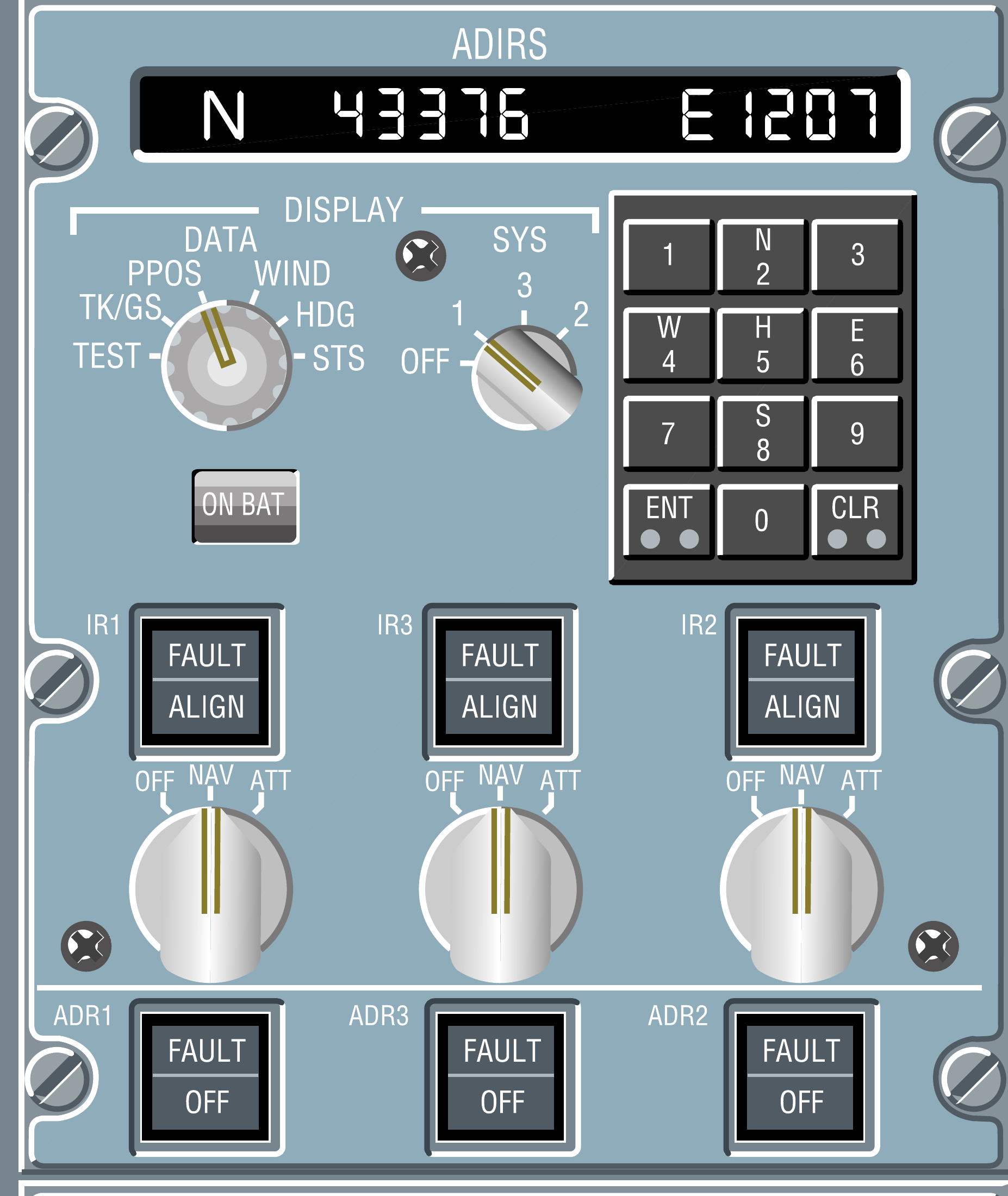
ADIRS CDU/keypad option: IR1 left, IR3 centre, IR2 right. [23, PDF p. 1]
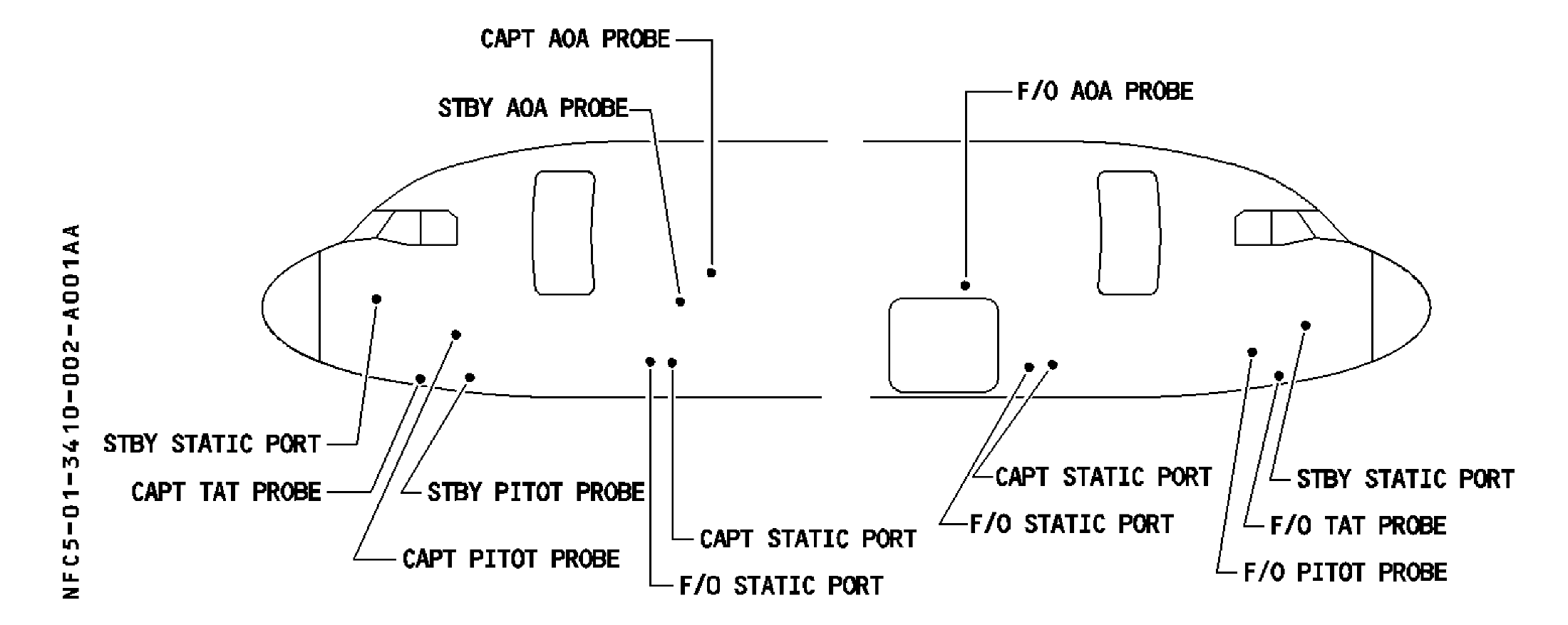
A320 air-data probe locations on the actual nose profile. [25, PDF p. 4]
IN PRACTICE: ADIRS: verify alignment and position
Before you begin: Stable electrical supply and the aircraft stationary. Use the actual ADIRS/GNADIRS standard fitted to the loaded Fenix aircraft; identify selectors by their printed unit numbers.
1. Identify all three units
Action. Read the IR unit labels on the installed overhead panel. Set all three mode selectors to NAV for normal preparation, checking each printed unit number rather than relying on a remembered left-to-right order.
Check. Each intended unit is selected to NAV. A different panel arrangement has not led to a missed selector. [25, PDF pp. 6-8] [14, PDF pp. 1012,1014]
2. Observe the alignment state
Action. Read the alignment indications provided by the installed units and keep the aircraft stationary. Note any fault or alignment-related message that requires attention before proceeding.
Check. Alignment is progressing in a known state. A fixed time borrowed from another setup has not replaced the actual indications. [25, PDF pp. 3-5] [25, PDF pp. 6-8]
3. Check the initialized position
Action. Compare the position reference used by the MCDU/ADIRS with the aircraft’s actual location and stand. Complete the installed unit’s required confirmation only through its actual interface.
Check. The position reference is credible. The older manual’s ALIGN IRS key sequence has not been assumed to be the interface of every Fenix configuration. [26, PDF pp. 106-107]
4. Check usable references
Action. After alignment, inspect attitude and heading on both primary flight displays and the navigation displays. Include the third unit’s own indications in the check rather than inferring its state from two working PFDs.
Check. The required inertial references are usable and no unresolved alignment/fault indication remains. [25, PDF pp. 3-5] [26, PDF pp. 486-491]
5. Finish the check before movement
Action. Return to this check before taxi if you continued other cockpit work during alignment. Confirm completion and the intended navigation source before relying on the programmed route.
Check. Preparation has gained time without moving the aircraft before the required alignment is complete. [26, PDF pp. 106-107] [14, PDF pp. 1010-1033]
Complete when: All required units have completed their alignment, the position reference is credible, and the flight displays provide usable attitude/heading information.