MANAGED CLIMB, OPEN CLIMB AND LEVEL CAPTURE
CLB follows managed climb guidance with the programmed vertical constraints. OP CLB climbs towards the selected altitude without observing those flight-plan altitude constraints in the same way. Select the mode that fits the clearance and required path and confirm it on the FMA. [58, PDF pp. 2,5-9] [58, PDF pp. 8,19]
As the aircraft approaches the target level, monitor capture, level-off and thrust response. Anticipate the transition so that a normal reduction in pitch is read in the context of the mode and altitude target. The active mode, actual path and remaining altitude should support the same interpretation. [58, PDF p. 10]
After a new clearance, set the appropriate altitude, request the intended mode and verify the result. Keep the flight plan, FCU target and guidance consistent through each change. A deliberate check after the selection is more useful than several corrections made before the first one has taken effect. [13, PDF pp. 125-128]
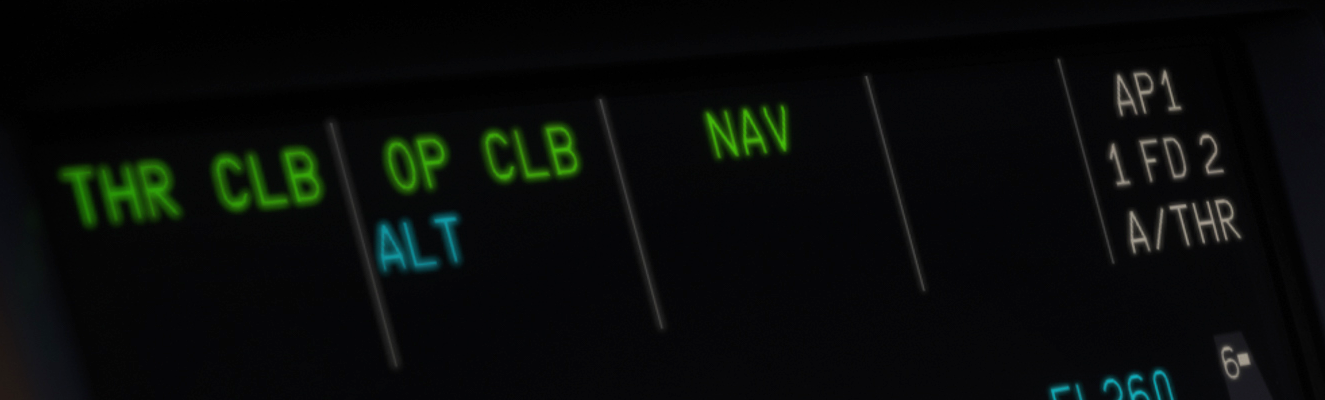
Detail of the actual Fenix FMA: THR CLB / OP CLB / NAV; ALT is armed. [1, Source illustration]
IN PRACTICE: Climb without losing the clearance in the automation
Before you begin: The aircraft is clean and established in the climb. The FCU shows the present cleared altitude, not an anticipated later clearance.
1. Read the vertical and lateral modes together
Action. Confirm the thrust levers in CL, autothrust active, and the intended climb/lateral guidance on the FMA. For a managed SID climb, look for CLB with NAV.
Check. The aircraft is using the climb logic that can respect the programmed altitude constraints along the route. [13, PDF pp. 125-128] [14, PDF pp. 1074-1077]
2. Apply a new altitude clearance explicitly
Action. Set the newly cleared altitude on the FCU. Push the altitude knob when continuing a managed climb along the flight plan, then read the resulting FMA.
Check. The altitude limit changes to the new clearance and CLB remains the intended managed mode. [13, PDF pp. 125-128] [14, PDF pp. 1074-1077]
3. Recognise a tactical climb as a different job
Action. If the clearance calls for a radar vector or an unrestricted climb, set the cleared heading/altitude and use the appropriate selected guidance. Read OP CLB if it is requested, and monitor any route constraints that it no longer follows automatically.
Check. The aircraft follows the tactical clearance. The selected mode is not being mistaken for managed constraint protection. [13, PDF pp. 125-128]
4. Check that the route keeps sequencing
Action. After a direct clearance or a vector, inspect the active leg and the next waypoint on the ND/F-PLN page. Rejoin or insert the cleared direct route deliberately.
Check. The aircraft is navigating to the intended next fix, and the displayed route still represents the clearance. [13, PDF pp. 125-128] [14, PDF pp. 1074-1077]
5. Read the level-off as it happens
Action. As the selected level approaches, watch ALT* and the subsequent level-flight indication. Check that the aircraft actually levels at the cleared altitude and that the pressure reference is correct.
Check. The capture completes without an unnoticed altitude-window error. Speed and thrust settle into the next phase. [14, PDF pp. 1074-1077] [13, PDF pp. 125-128]
6. Make the cruise entry agree with the clearance
Action. If the cleared cruise level differs from the level entered during preparation, update CRZ FL on the MCDU PROG page and compare the new predictions with the operational plan.
Check. The FMS knows the level actually being flown and can produce useful cruise speed, time and fuel predictions. [13, PDF pp. 129-140] [14, PDF pp. 1078-1081]
Complete when: The climb or level segment is correctly cleared, its modes are understood, and the FMS route and cruise level agree with the aircraft.