INIT B: LOADING, FIELD ORDER AND PREDICTIONS
Reconcile ZFW, ZFWCG and block fuel with the actual loaded aircraft and final loadsheet. These entries support performance and fuel predictions; an apparently reasonable value can conceal an unresolved loading change. Treat a revised final loadsheet as a reason to revisit the affected entries and calculations. [26, PDF p. 123]
Before start, move from INIT A to INIT B. In a field labelled ZFW/ZFWCG, the exercise entry is 60.0/27.0; BLOCK is 6.0, in the displayed units. Check the field order on the actual page: the historical Thales guide illustrates a different order. Read the accepted values back against actual EFB loading and the final loadsheet. [26, PDF p. 123] [54, PDF pp. 1-3]
The example's 60.0-tonne ZFW and 6.0-tonne block fuel give 66.0 tonnes at the stand; 0.2 tonnes of taxi fuel reduce the takeoff mass to 65.8. With route and cruise assumptions entered, compare the resulting time and fuel predictions with the OFP. Investigate a material difference before allowing it to become the basis of later fuel decisions. [26, PDF p. 123]
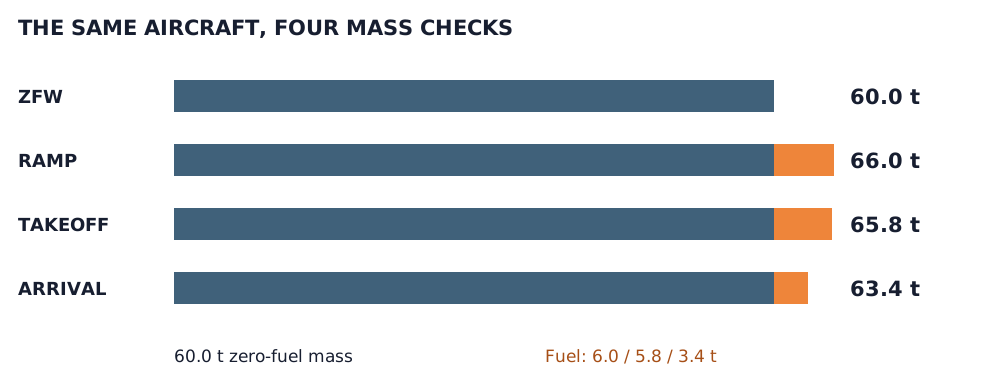
Exercise arithmetic: 60.0 t ZFW + 6.0 t block; 0.2 t taxi and 2.4 t trip. Arrival mass 63.4 t is a planning check, not a forced FMS prediction. [26, PDF pp. 115–117]
IN PRACTICE: INIT B: reconcile the load, then calculate
Before you begin: Engines not yet started. Loading and fuelling state known; final loadsheet and OFP available. Use metric tonnes for the stated exercise and verify the aircraft’s displayed units.
1. Separate requested load from actual load
Action. Open the EFB loading information and establish what is actually aboard. Compare final ZFW, ZFWCG and fuel with the latest loadsheet. If boarding or fuelling is still changing them, finish this check after completion.
Check. You have a final set of actual loading values, not merely the values that were requested earlier in the session. [54, PDF pp. 1-3] [54, PDF p. 4]
2. Open the preflight fuel-init page
Action. Press INIT and use horizontal slew to reach INIT B while the engines remain off. Check the field labels and units before entering any combined mass/CG value.
Check. The weight/fuel initialization page is displayed. You have not assumed that a field from the historical manual uses the modern Fenix order. [26, PDF p. 123]
3. Enter the mass and centre of gravity
Action. For a field labelled ZFW/ZFWCG, enter 60.0/27.0 for the exercise. If the displayed order differs, follow that label. Read the accepted weight and CG separately against the final data.
Check. ZFW is 60.0 tonnes and ZFWCG is 27.0 percent MAC for the teaching case. The two numbers have not been transposed. [26, PDF p. 123] [54, PDF pp. 1-3]
4. Enter block and taxi fuel
Action. Enter 6.0 in BLOCK for the exercise and verify TAXI against the planned 0.2 tonnes. For a current sector use the actual block and planned taxi fuel; review reserve assumptions from that OFP.
Check. The preflight fuel inputs agree with the planning case. Reserves have not been reduced merely to make an extra-fuel figure look more comfortable. [26, PDF p. 123]
5. Let the FMS calculate its prediction
Action. With the route, cruise reference, mass and fuel entered, allow the predictions to compute. Compare destination fuel and trip/time results with the OFP. Investigate a significant difference through the inputs and route.
Check. The FMS has a coherent basis for prediction. The exercise’s 2.4-tonne trip figure is a planning comparison, not a value to force into a calculated field. [26, PDF p. 123]
6. Keep an independent arithmetic reference
Action. For the teaching dataset, compare the 66.0-tonne ramp mass and 65.8-tonne takeoff mass with the stated block/taxi assumptions. The simple destination reference is 63.4 tonnes with 3.4 tonnes of fuel remaining.
Check. You can explain the arithmetic independently. Differences caused by a changed flight or loading state are identified rather than hidden by editing the wrong field.
7. Read back a convenience transfer
Action. If you use Send to MCDU, read the resulting entries against both the live aircraft and latest loadsheet. The V3 issue reported on 24–25 October 2026 sends live weights/trim rather than loadsheet data.
Check. A transfer is followed by verification. While loading is changing, the first transferred values are not mistaken for the final load information. [42]
Complete when: Accepted weight and fuel entries match the loaded aircraft and latest load information. Calculated predictions are checked rather than overwritten to match the exercise arithmetic.