DOORS, SLIDES AND CABIN READY IN V3
Door closure, slide arming and Cabin Ready describe separate states. Compare the reported door and slide conditions with the boarding and cabin sequence. A readiness announcement does not establish every door indication, and a closed door does not establish that the cabin check has finished. [40, PDF pp. 2–5] [11, CIDS and Flight Attendant Panel chapters]
The FAP provides cabin information and controls, while V3's Virtual Purser carries out supported crew tasks and communication. These include announcements, door and slide handling, cabin checks and Cabin Ready. Completion takes time and can vary with the cabin being checked. Include that sequence in the departure plan rather than treating it as background audio. [41, Virtual Purser / VP Behaviour]
Coordinate the supported services and door/slide handling, allow the cabin check to complete, and compare the crew report with FAP and ECAM information. A boarding or door change after readiness deserves another assessment of the affected state. Ground services, cabin tasks and cockpit preparation are concurrent activities with shared departure conditions. [41, Cockpit Cabin Call / Cabin Doors] [34, PDF pp. 3–4]
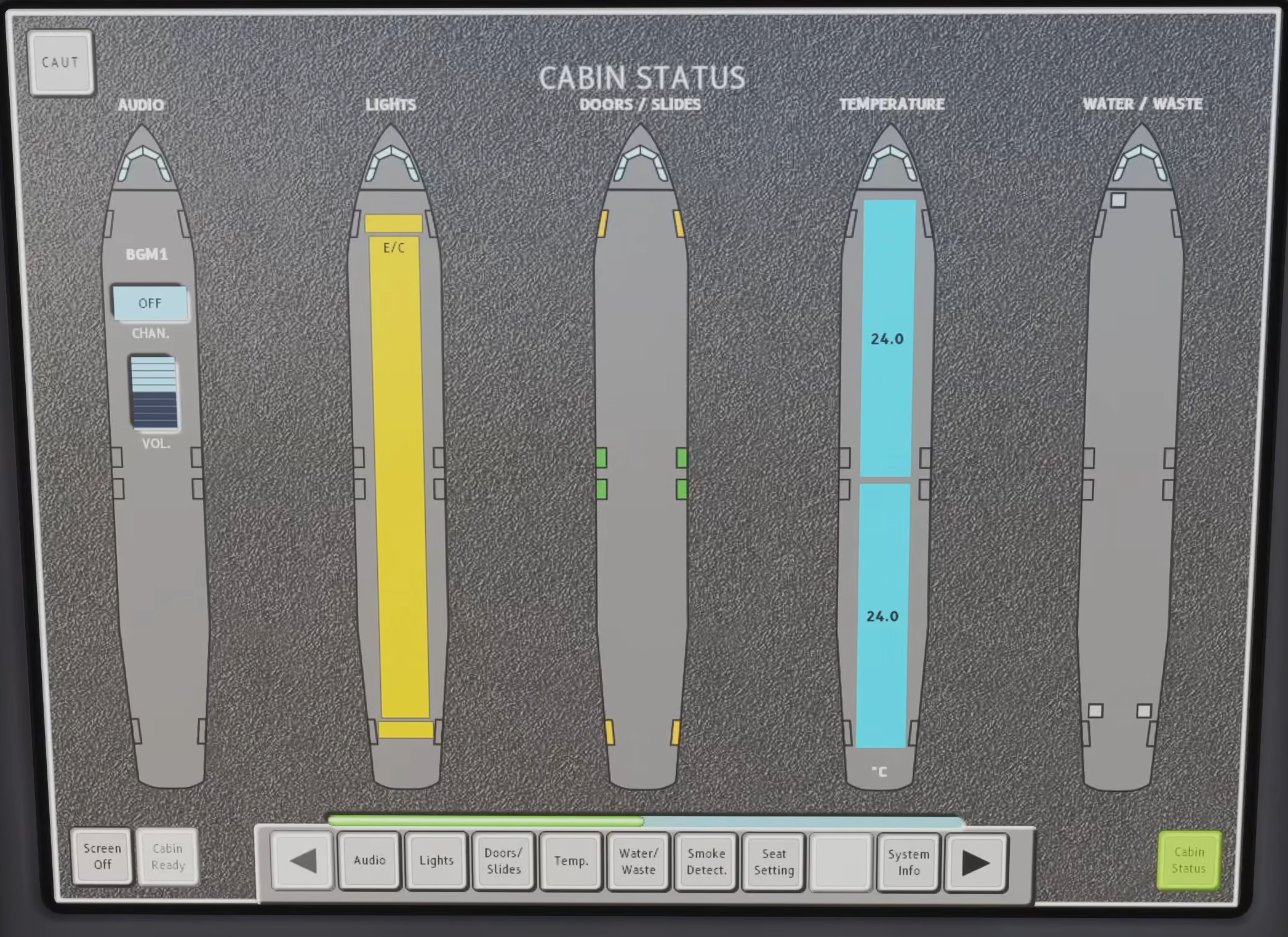
Original Fenix V3 FAP Cabin Status page: doors/slides, temperature, water/waste and the Cabin Ready button. Read the actual state rather than inferring that every item is ready. [2, Source illustration]
IN PRACTICE: V3 cabin readiness: separate the three confirmations
Before you begin: Coordinate the chosen boarding/ground-service/Virtual Purser workflow. This workshop spans gate preparation through the final before-takeoff readiness check; completion is tied to the actual cabin state.
1. Check the build and working interface
Action. Check the installed platform/build before relying on FAP interaction. Dave’s 24–25 October 2026 issue report lists FAP not interactable in FS2020 and answering Cabin Ready via the cockpit intercom as separate problems under investigation.
Check. An affected interaction is identified as unverified. This dated note does not claim a working workaround or make the limitation universal to every build/platform. [42]
2. Confirm actual door closure
Action. After boarding and the relevant services are complete, use the coordinated service/cabin workflow to close the required doors. Read their actual states on the working FAP and ECAM DOOR page.
Check. The required doors are reported closed. A completed service command has been followed by aircraft-state confirmation. [40, PDF pp. 2-5] [11, Chapters CIDS and FAP] [14, PDF pp. 1034-1038]
3. Confirm the slide state separately
Action. Allow the configured Virtual Purser to complete the appropriate arming actions, or use the applicable manual cabin workflow. Inspect the actual door/slide indications rather than treating door closure as proof of slide arming.
Check. The required slide state is confirmed for the intended phase and door configuration. [40, PDF pp. 6-8] [41, Virtual Purser; VP Behaviour]
4. Allow the cabin safety work to finish
Action. Follow the safety briefing and cabin-check progress through the configured cabin workflow. Let the Virtual Purser complete its checks and report readiness; do not substitute a guessed elapsed time for completion.
Check. The cabin safety work is actually complete. Readiness is a result of the cabin sequence, not simply of an earlier door indication. [41, Virtual Purser; VP Behaviour] [11, Chapters CIDS and FAP]
5. Read the configured Cabin Ready confirmation
Action. Confirm the crew report and the applicable FAP/ECAM readiness indication. Check the configuration in use: Fenix can show Cabin Ready as a checklist item, a memo or no FWC display, with the call separately configurable.
Check. The expected confirmation is interpreted for the loaded configuration. An absent optional display is not automatically called a failed cabin check. [41, Virtual Purser; VP Behaviour] [30]
6. Recheck before committing to departure
Action. At the relevant before-takeoff stage, confirm readiness again with the current door/slide and cabin state. Revisit the affected confirmations after a door change, renewed service or a new cabin issue.
Check. The final confirmation belongs to the aircraft’s present state. The departure is not relying on an out-of-date gate-side report. [11, Chapters CIDS and FAP] [14, PDF pp. 1063-1064]
Complete when: Required doors are closed, slides are in the intended state and Cabin Ready is genuinely confirmed through the working configured workflow, then rechecked at the relevant departure stage.